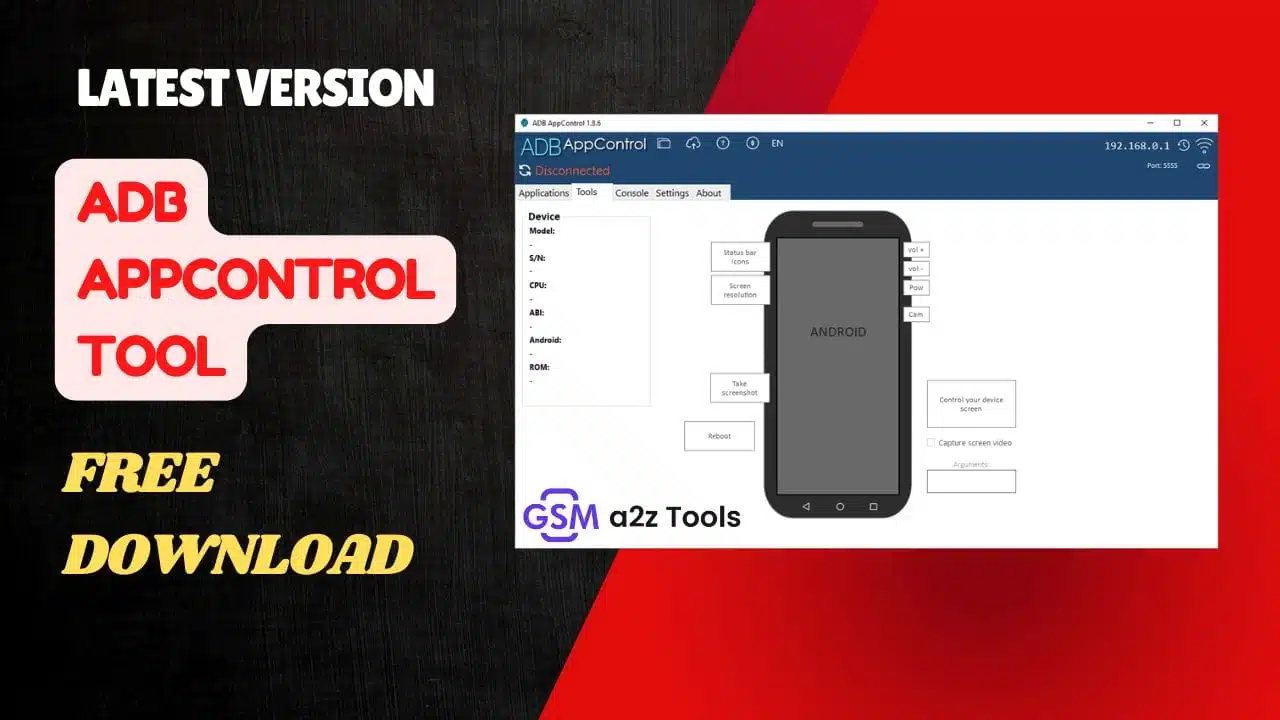
Simplify android app management and device control with adb appcontrol tool for windows.
Ever Felt Frustrated With All Those Useless Apps Clogging Up Your Android Phone—the Ones You Can’t Uninstall No Matter How Hard You Try? You’re Not Alone. Most Android Users Deal With Annoying Bloatware Or Hidden System Apps That Eat Up Space And Slow Things Down. That’s Where The Adb Appcontrol Tool Comes In—it’s The Simple No-root Way To Take Control Of Your Device Right From Your Pc.
In This Post You’ll Discover How The Adb Appcontrol Tool Makes App Management Easy Letting You View All Installed Apps Disable Or Uninstall System Ones Batch Install Apks Manage Permissions And Even Tweak Settings Like Screen Resolution Or Dpi. We’ll Walk You Through Its Key Features—from The Built-in Adb Console And Fastboot Support To Handy Utilities Like Taking Screenshots Or Rebooting Your Device—all While Keeping Things Clear And Beginner-friendly.
Adb Appcontrol Tool
If You’ve Ever Wished You Could Manage Uninstall Or Tweak Android Apps From Your Computer Without Rooting Your Device You’re In Luck. Adb Appcontrol Tool Makes It Simple To Control Your Android Device Through A Clean Windows Interface. It’s A Powerful Utility Designed For Anyone Who Wants More Control — Whether You’re A Developer Tester Or Just Someone Tired Of Unwanted Bloatware. Let’s Dive Into What Makes This Tool Special And How You Can Download The Latest Version For Free.
What Is The Adb Appcontrol Tool
Adb Appcontrol Tool Is A Windows-based Utility That Allows You To Manage Your Android Device Through Adb (android Debug Bridge) — Without The Need For Root Access. In Short It Gives You A Graphical Interface For Performing Powerful Adb Commands Safely And Quickly. You Can View All Installed Apps Disable Or Uninstall System And User Apps Install Split Apks And Even Extract Apk Files From Existing Apps. It’s Like Having A Professional Android App Manager Right On Your Pc.
Beyond App Management Adb Appcontrol Includes Tools For Developers Qa Engineers And Android Enthusiasts. You Can Change The Screen Resolution Modify Dpi Settings Take Screenshots Or Hide Status Bar Icons — All From Your Computer. The Tool Even Allows Reboots Into Recovery Or Bootloader Mode So You Don’t Need To Touch Your Device At All. It’s A Smart Way To Handle Device Optimization Testing And Customization Without Complex Adb Command Lines.
Also Read
Why Use Adb Appcontrol For Windows
There Are Plenty Of Reasons To Prefer This Over Typing Commands Manually. The Graphical Interface Saves Time Reduces Risk And Gives You Access To Features Like Batch App Uninstallations Preset Saving And Permission Management. If You’ve Used Adb Before You Know How Tedious Typing Each Package Name Can Be. This Program Automates That Process. Developers Can Use It To Prepare Clean Testing Environments While Regular Users Can Remove Pre-installed Apps And Free Up Space Safely.
Adb Appcontrol Tool Latest Versoin Free Download
Getting Started With Adb Appcontrol Tool Latest Version Free Download Is Simple. The Program Runs On Windows 7 8 8.1 10 And 11 — Requiring Only Microsoft .net Framework 4.6 Or Higher. Once Installed Connect Your Smartphone Or Tablet Via Usb Enable “usb Debugging” In Developer Options And Authorize The Connection. The Software Will Automatically Detect Your Android Device Showing A Detailed List Of All Installed Apps And System Components.
Here’s A Quick Look At What You Can Do Once Connected:
- App Management: Disable Or Uninstall System Apps Batch Install Apks Manage Permissions And Save App Presets.
- Utility Tools: Change Screen Resolution Hide Status Bar Icons Take Screenshots Or Reboot Into Recovery/bootloader.
- Advanced Tools: Use The Built-in Adb Console Enable Fastboot Support View Logcat Logs And Automatically Grant Permissions To Apps Like Tasker Or Battery Stats.
This Makes It One Of The Most Complete Debloat Tools For Android — Powerful Yet Safe For Both Rooted And Non-rooted Devices.
System Requirements for Installation
| Requirement | Details |
|---|---|
| Operating System | Windows 7 / 8 / 8.1 / 10 / 11 |
| Framework | .NET Framework 4.6 or later |
| Connection Type | Usb Cable Using Android Debug Bridge (adb) |
| Root Access | Not required |
| Supported Devices | Most Android Smartphones And Tablets |
With These Simple Requirements You Can Run The Software On Nearly Any Modern Pc. It’s Lightweight Quick To Install And Doesn’t Interfere With Your Android System Settings.
Step-by-step Guide To Connect Your Android Device
- On Your Android Phone Open Settings → About Phone → Tap Build Number Seven Times To Enable Developer Options.
- Go To Developer Options → Enable Usb Debugging.
- Connect Your Phone To Your Pc Using A Usb Cable.
- Launch Adb Appcontrol Tool.
- Authorize The Connection On Your Device.
- Explore Apps Manage Permissions And Remove Unwanted Bloatware With A Few Clicks.
That’s All It Takes To Start Managing Your Device Efficiently Through A Friendly Graphical Interface Instead Of Command Lines.
Features
App Management
- View All Installed Apps — Disable Or Uninstall System And User Apps (no Root Required).
- Batch Install/uninstall Apps.
- Supports Split Apk Installation (multiple Apks).
- Extract Apks From Installed Apps.
- Manage App Permissions Easily.
- Save And Load App Presets (collections Of Apps).
- Quick Search For Apps On Google Play Apkmirror Or F-droid.
Utility Tools
- View Device Information (model Android Version Etc.).
- Change Screen Resolution And Dpi Settings.
- Hide Status Bar Icons.
- Remote Control Device Buttons (power Volume Navigation Etc.).
- Take Screenshots From The Pc.
- Reboot Device Into Normal Recovery Or Bootloader Mode.

A powerful windows utility for managing android apps through adb without root access.
Advanced Tools
- Built-in Adb Console For Custom Commands.
- Fastboot Support.
- View Logcat Logs Directly.
- Automatically Grant Permissions To Certain Apps (e.g. Tasker Battery Stats).
- Simple File Upload Tool.
System Requirements
- Runs On Windows 7 8 8.1 10 11.
- Requires .net Framework 4.6 Or Higher.
Why It’s A Must-have For Android Power Users
If You Often Experiment With Android Or Simply Want To Clean Up Your Device This Tool Is Invaluable. It Combines The Flexibility Of Adb Commands With The Simplicity Of A Modern Gui. You Can Uninstall Pre-installed Apps Test Apks Manage System Settings And Even Send Files Directly To Your Device. Whether You’re Developing Testing Or Just Maintaining Your Smartphone Adb Appcontrol Gives You Precise Control With Minimal Effort.
Final Thoughts
The Adb Appcontrol Tool Bridges The Gap Between Android Customization And Ease Of Use. It’s Perfect For Anyone Who Wants To Manage Apps Remove Bloatware Or Fine-tune Their Android Device Without Root Access. With Features Like Fastboot Support Process Management And Preset Saving It’s More Than Just An App Manager — It’s A Full Android Device Management Suite.
So If You Want A Clean User-friendly And Powerful Way To Take Charge Of Your Phone Go Ahead And Download The Latest Version Of Adb Appcontrol Tool Today. It’s Free Safe And One Of The Best Tools Any Android User Can Have On Their Pc.
How To Download
- Find The File Or Content You Want To Download.
- Click On The (Download Link) Provided.
- Choose The Destination Folder On Your Device To Save The Downloaded File.
- Wait For The Download To Complete And Enjoy Your Content!
ADB AppControl Tool
Download Link:: Usersdrive – Mediafire – 4shared – Sendcm – Google Drive – My.pcloud – Playbook – Limewire – Workupload – Dropbox – Disk.yandex