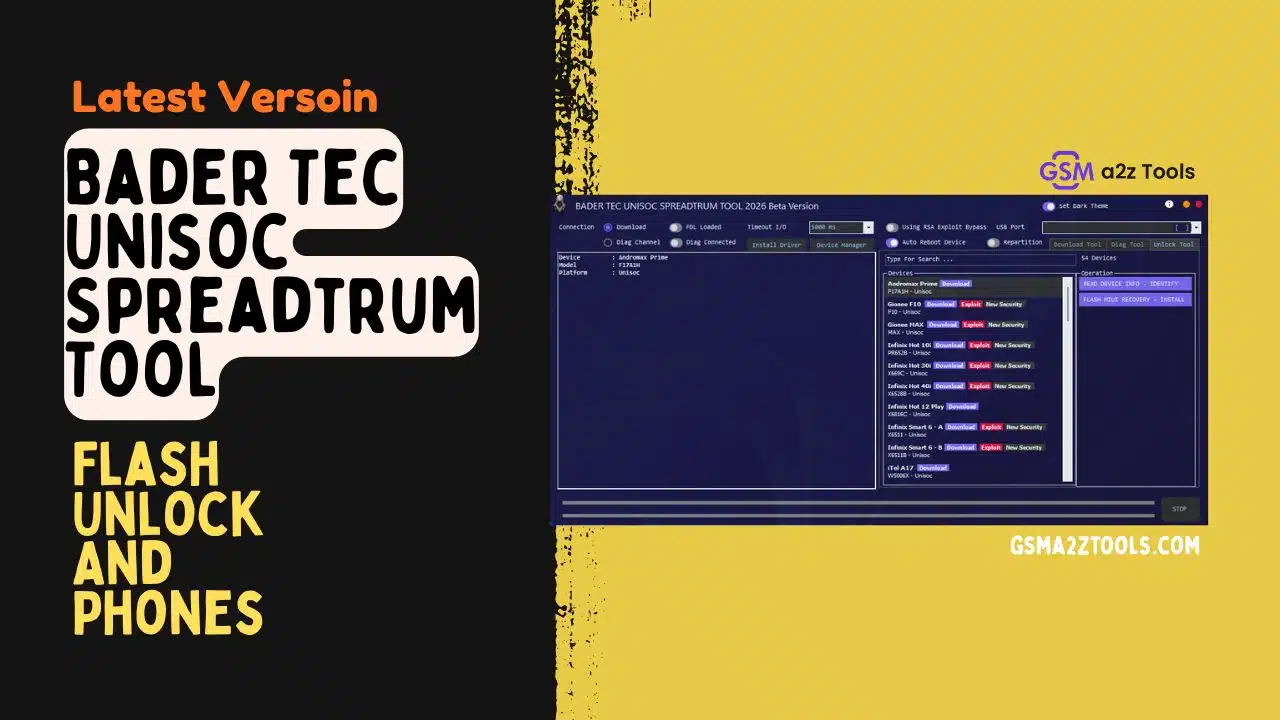
Bader tec unisoc spreadtrum tool used for pac firmware flashing frp unlocking and diagnostic repair on unisoc phones.
If Your Unisoc Phone Is Stuck After A Reset Not Connecting To The Pc Or Showing An Frp Lock It Can Feel Really Stressful. You Try Different Tools But Nothing Seems To Work And Every Failed Attempt Just Wastes More Time. That’s When Many People Start Searching For Something Reliable Like The Bader Tec Unisoc Spreadtrum Tool To Finally Fix The Problem.
In This Guide You’ll Learn How This Tool Helps With Flashing Pac Firmware Installing Drivers Entering Download Or Diag Mode And Even Removing Frp Safely. We’ll Also Explain Its Unlock Features Device Detection And Security Exploit Options In A Simple Way. By The End You’ll Know Exactly Which Buttons To Use And How To Repair Your Unisoc Device With Confidence.
What Is The Bader Tec Unisoc Spreadtrum Tool
If You’ve Ever Tried Fixing A Unisoc Phone You Know It Can Be Stressful. Phones May Get Stuck On The Logo Fail During Updates Or Lock After A Factory Reset. That’s When Bader Tec Unisoc Spreadtrum Tool Becomes Useful For Technicians And Advanced Users. It Connects Using Download Mode And Diag Channel Which Helps Communicate Directly With The Phone. It Also Helps Install Drivers So Your Pc Detects The Device Properly.
What Makes This Tool Powerful Is That It Combines Flashing Unlocking And Diagnostic Features In One Place. You Can Load Fdl1 And Fdl2 Files Then Add The Pac Firmware Without Using Separate Software. It Also Lets You Manage Partitions Read Memory And Erase Frp Accounts When Needed. If Normal Flashing Does Not Work Diag Mode Options Can Help Fix Deeper Software Problems.
Also Read
Download And Flash Tool Module
This Section Is Mainly Used For Firmware Repair And System Recovery. You Can Flash Pac Files Erase Partitions And Read Partitions For Backup. The Tool Also Shows File Ids Sectors And Memory Locations So Advanced Users Know What Is Being Written To The Device.
It Includes A Stop Process Button In Case You Need To Cancel Flashing Quickly. This Is Helpful If You Selected The Wrong File Or Notice A Connection Problem. These Safety Options Help Reduce The Risk Of Hard-bricking The Phone.
Connection And Driver Management
Before Flashing Drivers Must Be Installed Correctly. The Tool Provides Install Driver And Device Manager Buttons So You Can Confirm Everything Is Set Up. Once Drivers Are Ready The Phone Can Be Detected In Download Mode Or Diag Mode.
Status Indicators Like Fdl Loaded And Diag Connected Show When The Phone Is Ready For Operations. This Prevents Starting Flashing When The Device Is Not Properly Connected Which Could Damage The System.
Bader Tec Unisoc Spreadtrum Tool Latest Verosin Free Download
Using The Latest Version Of The Tool Is Very Important Because Phone Security Keeps Improving. Older Tools May Fail To Unlock Or Flash Devices With New Security Patches. The Latest Version Includes Exploit Support That Works With Updated Android Protection. It Also Improves Usb Stability And Flashing Success Rate.
New Versions Also Bring Better Compatibility With Different Unisoc Chipsets. This Helps Reduce Errors When Connecting Newer Phones. If You Repair Phones Often Staying Updated Saves Time And Avoids Failed Repair Attempts.
Firmware Loading And Flash Settings
The Tool Allows You To Load Pac Firmware Along With Fdl1 And Fdl2 Files. This Setup Ensures Proper Communication During Flashing. You Can Also Enable Options Like Auto Reboot After Flashing And Repartition When Required.
Timeout I/o Settings And Usb Port Selection Help Control The Flashing Process. These Settings Are Useful When Dealing With Unstable Connections Or Slow Systems. Proper Configuration Makes Flashing Smoother And Safer.
Diag Tool And Factory Test Features
Some Issues Are Not Related To Firmware But To Hardware Calibration Or Network Problems. The Diag Tool Lets You Enter Calibration Mode And Factory Test Mode To Check Deeper System Functions. This Is Helpful For Signal Issues Sensor Errors And Device Testing.
You Can Also Perform Factory Reset Or Power Off Directly From The Tool. This Saves Time Compared To Using Button Combinations On The Phone.
At Commands And Imei Read Write
Advanced Users Can Send At Commands Through The Built-in Command Box. This Allows Checking Modem Responses And Network Communication. It Is Useful For Diagnosing Sim And Signal Problems.
The Tool Can Read And Write Imei For Both Sim Slots. However Imei Modification Is Illegal In Many Countries So This Feature Should Only Be Used Where Legally Allowed And For Genuine Repairs.
Unlock Tool And Device Database
The Unlock Section Includes A Built-in Device List With Supported Brands And Models. You Can Search Using The Search Bar And Quickly Find Your Device. This Reduces Mistakes When Working With Many Phones.
Once Connected The Tool Shows Device Name Model Number And Chipset Information. This Helps Confirm Compatibility Before Flashing Or Unlocking. It Also Supports Device Identification Even When The Phone Does Not Boot.
Exploit And New Security Support
Modern Android Versions Have Strong Protection Against Unauthorized Access. The Tool Includes Exploit Options Designed To Work With Newer Security Systems. This Allows Unlocking And Access On Devices Where Old Tools Fail.
It Also Supports Installing Recovery In Some Cases Which Helps When Phones Are Soft-bricked. These Features Make The Tool Useful For Difficult Repair Cases.
Features Bader Tec Unisoc Spreadtrum Tool:
Download / Flash Tool
Connection & Drivers
- Download Mode
- Diag Channel
- FDL Loaded
- Diag Connected
- Install Driver
- Device Manager Open Button
Settings
- Timeout I/O (5000 ms)
- Using RSA Exploit Bypass
- USB Port Select
- Auto Reboot Device
- Repartition Option
- Dark Theme Switch
Flash / Partition Options
- File IDs
- Partitions
- Sectors
- Lengths
- File Sizes
- Locations
Firmware Loading
- FDL1 File Load
- FDL2 File Load
- PAC Firmware Load
Actions / Buttons
- Erase FRP Account
- Erase Partition
- Read Partition
- Identify Device
- Flash Firmware
- STOP Process
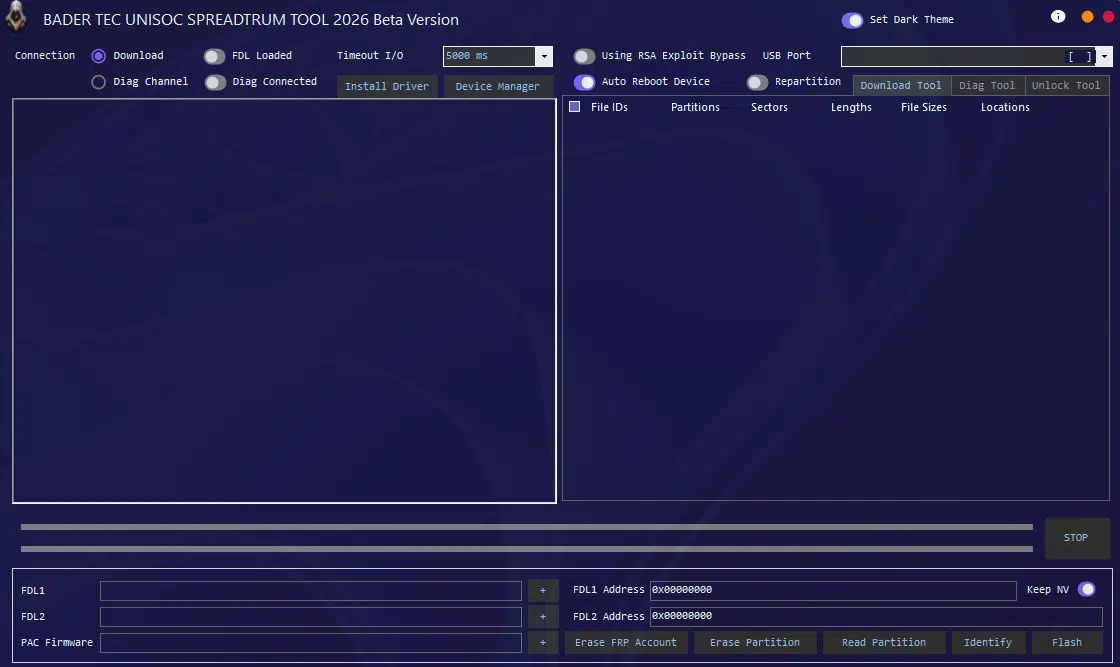
Bader tec unisoc spreadtrum tool free version used for flashing pac firmware and repairing unisoc phones.
Diag Tool
Connection Mode
- Calibration Mode
- Factory Test Mode
Main Functions
- Enter Diag Mode
- Factory Reset
- Power Off
AT Command Section
- AT Command Input Box
- Send AT Command Button
IMEI Read / Write
- IMEI 1 Read
- IMEI 1 Write
- IMEI 2 Read
- IMEI 2 Write
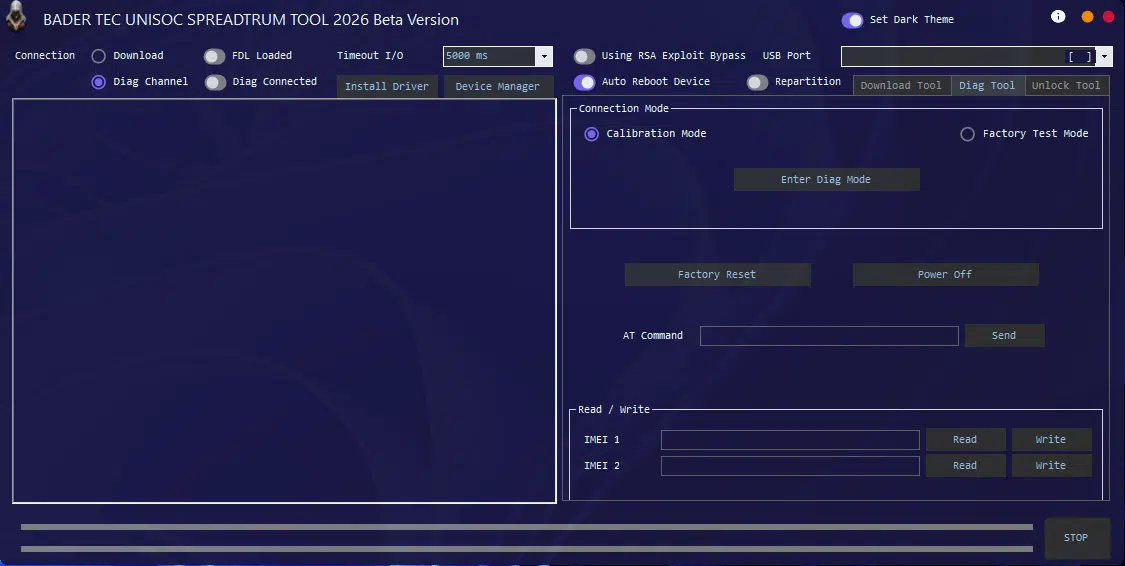
Bader tec unisoc spreadtrum tool used to flash pac firmware remove frp lock and diagnose unisoc chipset devices.
Unlock Tool
Device Info Panel
- Device Name Show
- Model Number
- Platform (Unisoc)
Device Search & List
- Search Bar
- Total Devices Count (54 Devices)
- Brand + Model List
- Chipset Info (Unisoc)
Exploit & Security
- Download Mode Support
- Exploit Button
- New Security Support
Operations Panel
- Read Device Info (Identify)
- Flash MIUI Recovery Install
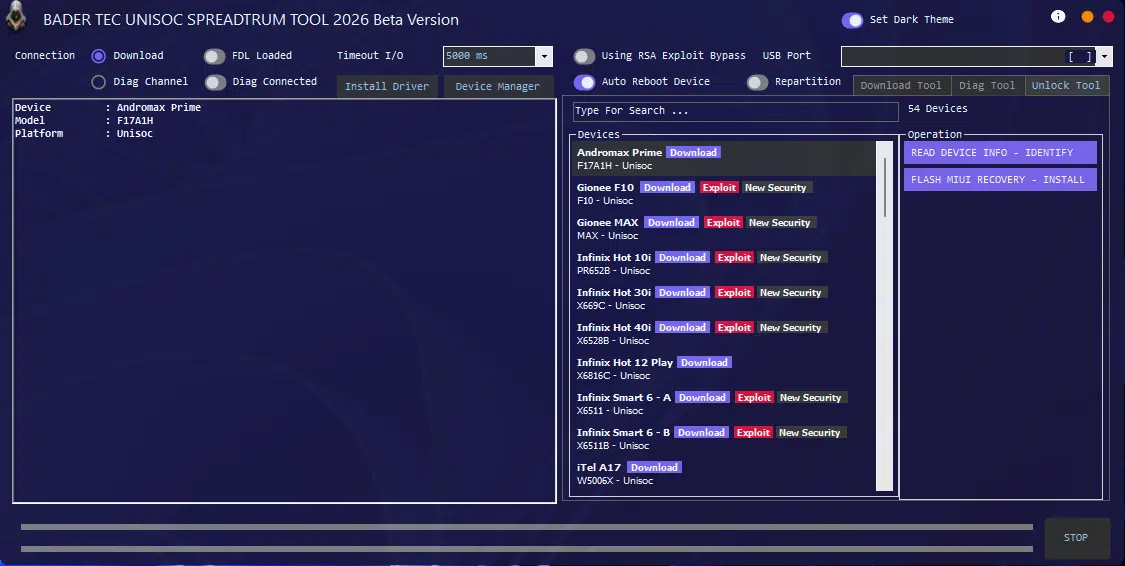
Bader tec unisoc spreadtrum tool used for flashing pac firmware removing frp lock and repairing unisoc chipset devices.
How To Use
- Download & Extract To Your Computer.
- Now Open Folder & Run “Bader Tec Unisoc Spreadtrum Tool.exe” As Admin
- Now The Tool Will Open
- Enjoy
Frequently Asked Questions (FAQs)
What Is Bader Tec Unisoc Spreadtrum Tool?
Bader Tec Unisoc Spreadtrum Tool Is Used To Flash Pac Firmware Remove Frp Lock Fix Bootloop And Repair Unisoc Chipset Phones.
Does Bader Tec Unisoc Spreadtrum Tool Support Download Mode?
Yes It Supports Download Mode To Connect Devices For Flashing Firmware And System Repairs.
Can I Erase Frp Using Bader Tec Unisoc Spreadtrum Tool?
Yes The Tool Includes An Erase Frp Account Option But It Should Only Be Used On Devices You Own Or Have Permission To Repair.
Why Does Bader Tec Unisoc Spreadtrum Tool Show “Fdl Loaded”?
Fdl Loaded Means The Loader Files Are Successfully Loaded And The Phone Is Ready For Flashing Operations.
What Is Diag Mode In Bader Tec Unisoc Spreadtrum Tool?
Diag Mode Allows Calibration Factory Testing And Advanced Hardware Diagnostics On Supported Unisoc Devices.
Final Words
Unisoc Phones Have Become Very Common In The Budget Market So Having Strong And Reliable Repair Tools Is Important. Bader Tec Unisoc Spreadtrum Tool Combines Flashing Diag And Unlock Features In One Software Which Makes Repair Work Much Easier For Technicians. You Can Flash Pac Firmware Identify Devices And Handle Many Security-related Issues From A Single Interface.
When The Tool Is Used With The Correct Firmware And Proper Steps It Can Quickly Fix Many Software Problems. Always Stay Within Legal Limits And Avoid Flashing Incorrect Files To Prevent Permanent Damage. By Following Safe Repair Practices You Can Keep Devices Protected And Complete Repairs Successfully.
How To Download
- Find The File Or Content You Want To Download.
- Find The Download Page And Don’t Click Button And Click Only The (Download Link)
- Choose The Destination Folder On Your Device To Save The Downloaded File.
- Wait For The Download To Complete And Enjoy Your Content!
Bader Tec Unisoc Spreadtrum Tool
Download Link:: Usersdrive – Mediafire – 4shared – My.pcloud – Playbook – Limewire – Disk.Yandex – DropBox – Mega – Vexfile – Drive Proton