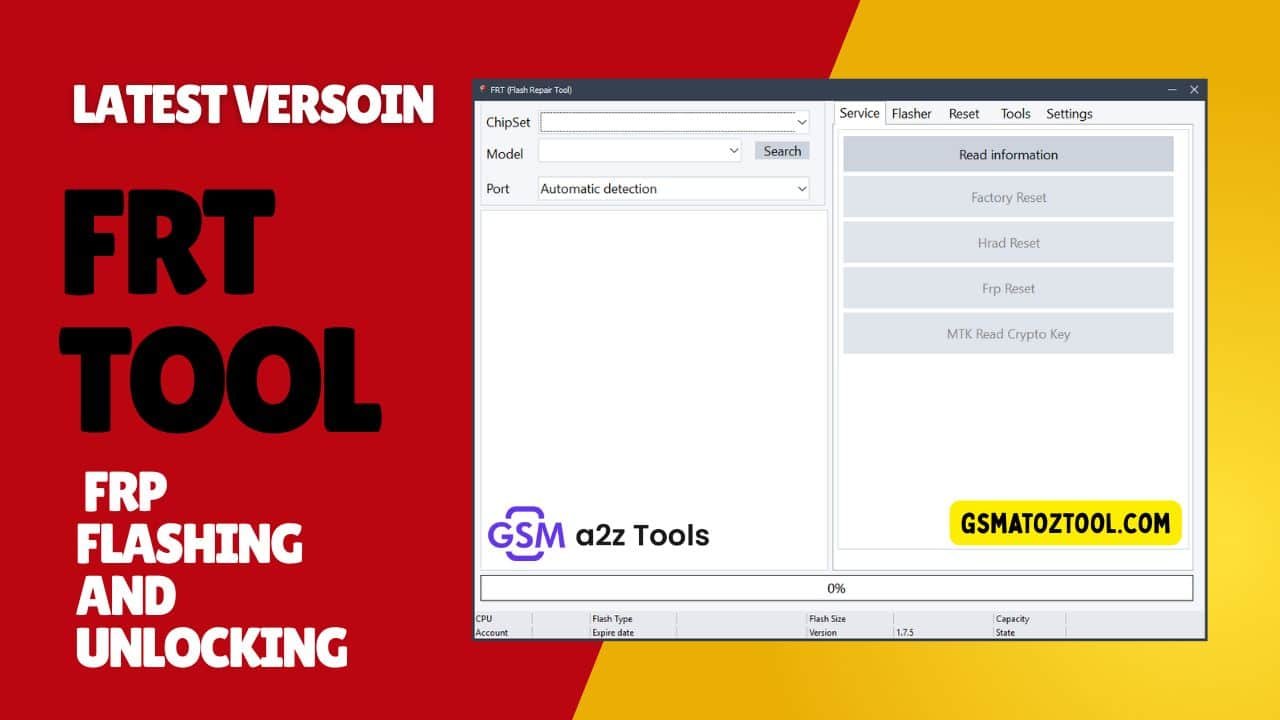
Frt tool dashboard with service flasher and tools tabs for flashing firmware resetting phones and removing frp locks
When Your Android Phone Is Stuck On Frp Lock Won’t Boot Properly Or Needs A Clean Firmware Flash It Can Feel Frustrating And Confusing—especially When Nothing Seems To Work. Many Users Search For A Reliable Solution After Failed Resets Or Flashing Errors Hoping To Find A Tool That Actually Gets The Job Done Without Making Things Worse. That’s Where Frt Tool Comes Into The Picture Offering Hope When Standard Methods Fall Short.
In This Blog Post You’ll Learn How Frt Tool Helps With Frp Reset Factory And Hard Reset Firmware Flashing And Advanced Service Functions Through Its Service Flasher And Tools Tabs. We’ll Break Down Its Key Features Like Read Information Mtk Crypto Key Reading Ofp Firmware Extraction Imei Services And Advanced Flashing Options In Simple Terms. By The End You’ll Clearly Understand How Works And How It Can Solve Common Android Software And Lock Issues Effectively.
Frt Tool Latest Version For Android Flashing Frp Reset & Imei Repair
Android Phone Problems Don’t Usually Start Big—they Begin With A Small Mistake. A Failed Reset A Forgotten Google Account Or A Flash That Didn’t Go As Planned Can Suddenly Turn Your Device Into A Headache. When Regular Methods Stop Working Users Start Searching For A Tool That Can Actually Fix Things Instead Of Making Them Worse.
That’s Exactly Why Frt Tool Has Gained Attention Among Technicians And Advanced Android Users. It’s Designed To Handle Serious Software Tasks Like Frp Reset Firmware Flashing Device Servicing And Even Imei-related Operations From One Clean Dashboard.
Download The Frt Tool Latest Versoin
Before Downloading Frt Tool Always Make Sure You’re Getting The Latest Version From A Trusted Source. Updated Versions Usually Bring Better Device Support Bug Fixes And Improved Stability. Using An Outdated Release May Cause Compatibility Issues Or Failed Operations So Keeping The Tool Updated Is Important For Safe And Successful Android Servicing.
What Is The Frt Tool
Frt Tool Is A Professional Android Service Utility Built To Perform Advanced Repair And Flashing Operations On Supported Devices. It Brings Together Multiple Service-level Functions That Are Usually Scattered Across Different Tools Saving Time And Reducing Risk During Repairs.
What Makes Frt Tool Stand Out Is Its Organized Interface Where Service Flasher And Tools Tabs Are Clearly Separated. This Allows Users To Reset Frp Read Device Information Flash Firmware Extract Ofp Files And Manage Imei-related Services In A Controlled And Systematic Way.
Features Frt Tool:
Service Tab
- Read Information
- Factory Reset
- Hard Reset
- FRP Reset
- MTK Read Crypto Key
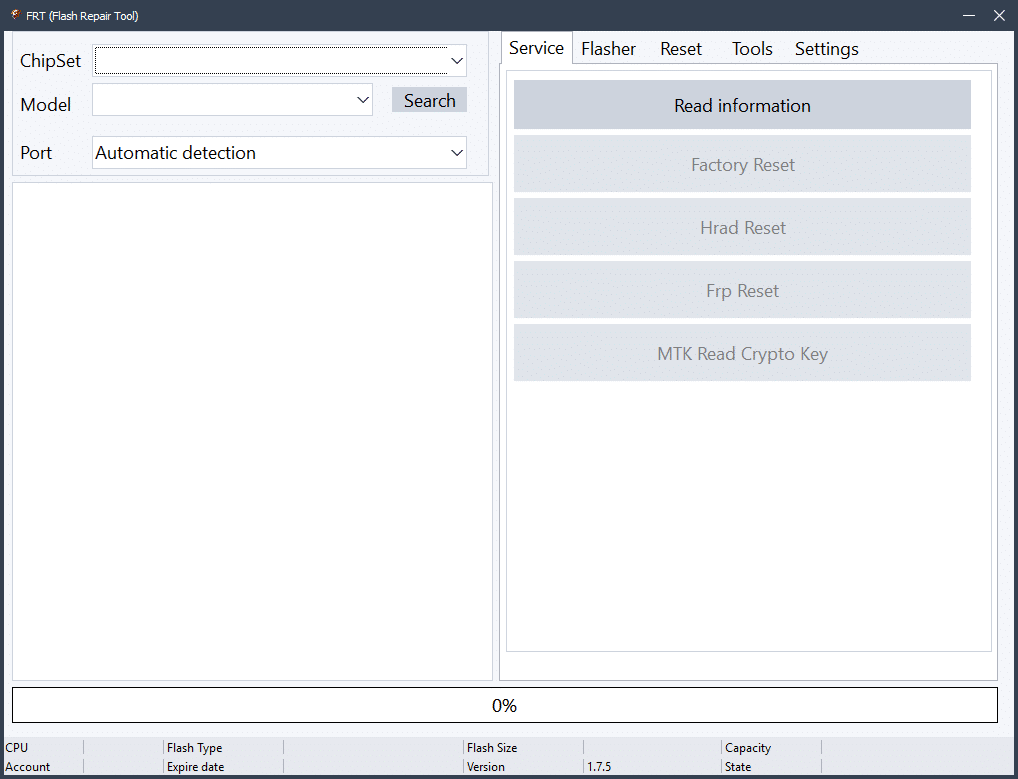
Frt tool dashboard with service flasher and tools tabs for firmware flashing frp removal and device repair
Flasher Tab
Function Options
- Read Info (Device details read)
- Backup (Firmware ka backup)
- Flash (Firmware flash kare)
- Erase (Partitions erase kare)
Advanced Flash Options
- Block (Map)
- Start Address (Hex)
- Size (Hex)
- Page
- Logical Unit Number
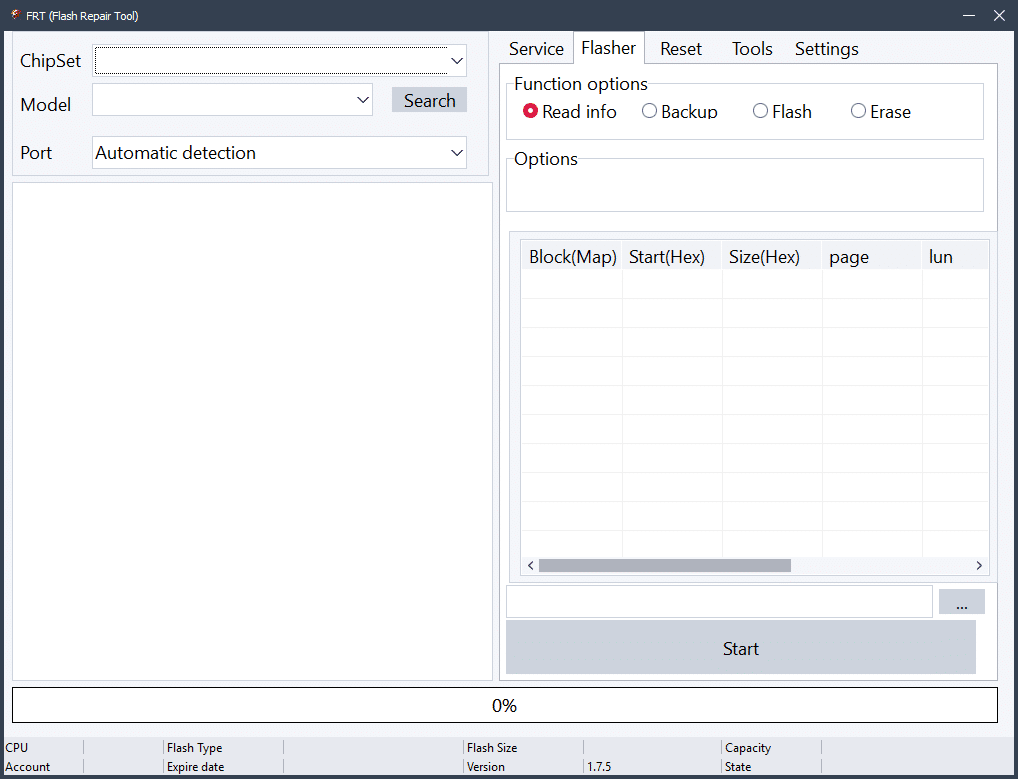
Frt tools dashboard with service flasher and tools tabs used for firmware flashing frp removal and device repair
Tools Tab
Firmware Tools
- Qualcomm Extract OFP Firmware
- MediaTek Extract OFP Firmware
- Pack Super IMG
- Pack Super Meta
IMEI Repair Service
- Read IMEI
- Repair IMEI
- Repair BT MAC
- Repair WiFi MAC
- Repair Serial Number (SN)
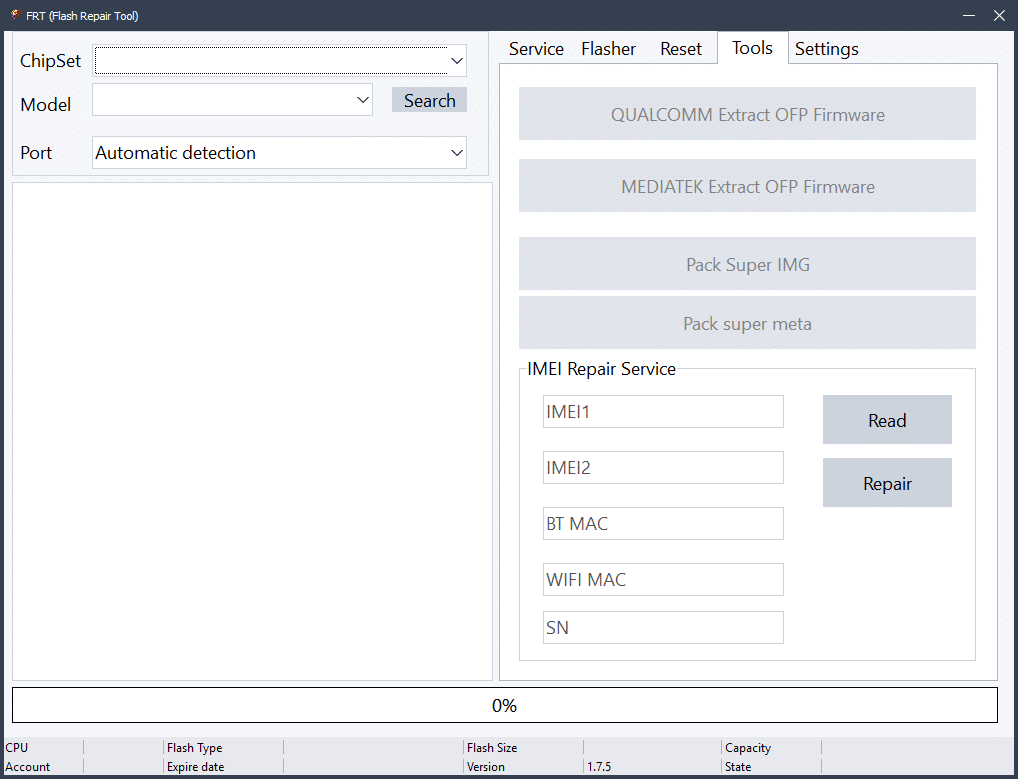
Frt tool dashboard with service flasher and tools tabs for android flashing frp reset and imei repair
Note: Imei Repair Legal Permission Ke Sath Hi Use Karein
Frt Tool Supported Functions Overview
Frt Tool Isn’t Limited To Just One Task—it’s An All-in-one Solution For Android Software Servicing. Whether You’re Dealing With A Locked Phone Or A Corrupted System The Tool Provides Multiple Options To Recover And Repair Devices Safely.
From Basic Actions Like Factory Reset And Hard Reset To Advanced Processes Such As Mtk Read Crypto Key And Ofp Firmware Extraction Covers Both Beginner Needs And Technician-level Operations Without Unnecessary Complexity.
Service Tab Features In Frt Tool
The Service Tab Is Where Most Users Begin Their Repair Process. It Focuses On Direct Device Servicing Tasks That Help Fix Common Android Problems Without Flashing Full Firmware.
Using This Tab You Can Perform Read Information To Check Device Details Execute Factory Reset Or Hard Reset And Remove Google Account Locks Using Frp Reset. For Mediatek Devices The Mtk Read Crypto Key Function Is Especially Useful When Dealing With Secure Operations.
Read Information And Reset Options
The Read Information Feature Allows You To View Essential Device Data Before Making Any Changes. This Includes Model Details Security Status And Other Identifiers That Help You Choose The Correct Operation.
Reset Options Like Factory Reset And Hard Reset Are Helpful When A Phone Is Stuck Slow Or Facing System Glitches. Frp Reset Is Used When A Device Is Locked After Reset And Asks For The Previously Synced Google Account.
Flasher Tab Explained
The Flasher Tab Is Designed For Full Firmware-level Operations. It’s Commonly Used When A Phone Is Bricked Bootlooping Or Needs A Clean Software Installation.
This Section Supports Reading Device Info Creating Firmware Backups Flashing Stock Firmware And Erasing Specific Partitions. Advanced Users Appreciate The Control It Offers During Critical Flashing Processes.
Flash Backup And Erase Functions
Backup Lets You Save Firmware Before Making Risky Changes Which Is Essential For Safety. Flash Is Used To Install Firmware Files To Fix Software Corruption Or Upgrade The System.
The Erase Function Allows Selective Partition Wiping Which Helps Remove Stubborn Errors Without Flashing The Entire Firmware Again. These Features Make Frt Tool Reliable For Both Repair And Maintenance Tasks.
Advanced Flash Options In Frt Tool
Advanced Flash Options Are Built For Experienced Users Who Need Precise Control. These Settings Include Block (map) Start Address (hex) Size (hex) Page And Logical Unit Number.
Such Options Are Useful When Working With Damaged Partitions Or Specific Memory Areas. Used Correctly They Help Recover Devices That Normal Flashing Tools Fail To Fix.
Tools Tab And Firmware Utilities
The Tools Tab Expands Frt Tool Beyond Basic Flashing. It Focuses On Firmware Handling And Advanced File Operations That Technicians Often Need.
You Can Extract Qualcomm And Mediatek Ofp Firmware Pack Super Img Files And Create Super Meta Packages. These Tools Save Hours Of Manual Work And Reduce The Chance Of Errors.
Qualcomm And Mediatek Ofp Extraction
Ofp Firmware Files Are Often Compressed And Difficult To Manage Manually. Frt Tool Simplifies This Process By Allowing Direct Extraction For Both Qualcomm And Mediatek Platforms.
This Feature Is Especially Helpful When You Need Specific Images From Firmware Instead Of Flashing The Whole Package.
Imei Repair Service In Frt Tool
Frt Tool Also Includes Imei-related Service Options For Supported Devices. Users Can Read Imei Repair Imei And Fix Bt Mac Or Wifi Mac Issues When Software Corruption Causes Network Problems.
There Is Also An Option To Repair Serial Number (sn) Which Helps Restore Device Identity After Flashing Issues. Always Remember These Features Should Only Be Used With Proper Legal Permission As Required By Local Laws.
Frt Tool Interface And User Experience
One Of The Strongest Points Of Frt Tool Is Its Clean And Logical Interface. The Dashboard Clearly Shows Service Flasher And Tools Tabs Making Navigation Easy Even For New Users.
This Structured Layout Reduces Mistakes And Helps Users Focus On The Exact Task They Need—whether It’s Flashing Firmware Resetting Frp Or Extracting Ofp Files.
Who Should Use Frt Tool
Frt Tool Is Ideal For Mobile Technicians Repair Shop Owners And Advanced Android Users. If You Regularly Deal With Frp Locks Flashing Errors Or Software Corruption This Tool Can Save You Time And Frustration.
Even Semi-advanced Users Can Benefit As Long As They Follow Instructions Carefully And Understand The Functions They Are Using.
Frequently Asked Questions (FAQs)
What Is Frt Tool Used For?
Frt Tool Is An Android Service Utility Used For Flashing Firmware Resetting Frp Locks Performing Factory Or Hard Resets Extracting Ofp Firmware And Handling Imei-related Services On Supported Devices.
Does Frt Tool Support Frp Reset On Android Phones?
Yes Frt Tool Includes An Frp Reset Option In The Service Tab Which Helps Remove Google Account Locks After A Factory Reset On Supported Android Devices.
Which Chipsets Are Supported By Frt Tool?
Frt Tool Supports Multiple Platforms Including Mediatek And Qualcomm Devices. It Also Offers Mtk Read Crypto Key And Ofp Extraction For Both Chipsets.
Can I Flash Firmware Using Frt Tool?
Yes The Flasher Tab Allows You To Flash Firmware Take Firmware Backups Read Device Information And Erase Specific Partitions When Needed.
Is Imei Repair Possible With Frt Tool?
Frt Tool Provides Imei Services Such As Read Imei Repair Imei Repair Bt Mac Repair Wifi Mac And Repair Serial Number. These Options Should Only Be Used With Proper Legal Permission.
Final Thoughts On Frt Tool
Frt Tool Is More Than Just Another Android Utility—it’s A Complete Servicing Solution Built For Real-world Repair Problems. From Frp Reset And Firmware Flashing To Ofp Extraction And Imei Services It Offers Everything In One Place.
If You’re Serious About Android Repair And Want A Tool That Balances Power With Usability Is Worth Considering—used Responsibly And With Proper Knowledge.
How To Download
- Find The File Or Content You Want To Download.
- Find The Download Page And Don’t Click Button And Click Only The (Download Link)
- Choose The Destination Folder On Your Device To Save The Downloaded File.
- Wait For The Download To Complete And Enjoy Your Content!
FRT Tool v.1.7.5
Download Link:: Usersdrive – Mediafire – 4shared – My.pcloud – Playbook – DropBox – Mega – Vexfile – Drive Proton