
Samstool samsung exynos mediatek unisoc and qualcomm snapdragon devices with frp unlock read and write flash backup and restore service and repair and wide device support.
Samsung Repair Is A Different Beast. You Think You’ve Got The Right Tool You Connect The Phone And Then Nothing. Wrong Chipset. Unsupported Model. Feature Greyed Out. That’s The Frustration That Led Me To Samstool And Honestly It’s The First Samsung Tool In A While That Didn’t Disappoint.
This Post Covers Everything Samstool Does. We’re Talking Imei And Mac Repair Certificate Handling Frp Reset Network Unlock Bootloader Control Csc Change Eub Mode Partition Manager Kg State Firmware Update Battery Reset And Backup Operations. It’s A Lot But Stick With Me Because Every Single One Of These Features Has A Real-world Use Case. Comes Up In Daily Repair Work More Than You’d Expect.
What Is The Samstool
Here’s The Short Version. Samstool Is A Windows-based Repair Utility Built Exclusively For Samsung Devices. It’s Not A Generic Android Tool With Samsung Support Added As An Afterthought. It’s Samsung-first Top To Bottom And That Distinction Matters More Than Most People Realize.
What Really Got My Attention Was The Chipset Coverage. Exynos Mtk Unisoc And Qualcomm All Four Major Samsung Chipset Families Supported In One Tool. Most Tools Pick Two And Call It A Day. Samstool Covers The Latest Generation Across All Four Which Means You Can Handle Almost Any Samsung That Lands On Your Bench Without Reaching For Something Else.
Why Samstool Stands Out For Samsung Repair
Let Me Be Direct. Samsung Repair Is Hard Knox Security Region-locked Firmware Multi-chipset Models Carrier-specific Software Layers All Working Against You. Generic Tools Trip Over All Of This Constantly And Most Of Them Don’t Even Warn You Before They Fail. Samstool Doesn’t Have That Problem Because It Was Built Specifically For Samsung’s Ecosystem From Day One.
The Feature Depth Is Where This Becomes Obvious In Practice. Main Features Alone Include Imei Repair Mac Repair Certificate Read And Write Frp Reset Network Factory Reset Read Codes Online Sw Change Bootloader Unlock And Relock Csc Change Device Info And Backup Store And Restore. Then There’s A Whole Extended Functions Panel Sitting On Top Of All Of That. Every Single Function Has A Specific Real-world Scenario Where Nothing Else Will Do The Job Properly.
Features:
- Repair IMEI
- Repair MAC
- Patch Certificate
- Reset FRP Lock/ FRP Remove
- Network Factory Reset
- Read Codes Online
- SW Change
- Unlock / Relock Bootloader
- CSC Change
- Device Info
- Read Certificate
- Write Certificate
- Store / Restore Backup
Supported Latest Generation Of Exynos Mtk Unisoc Qualcomm Based Samsung Devices.
Functions:
- Switch To Eub Mode
- Easy Partition Manager
- Reset Frp
- Repair Boot
- Read Info
- Set Kg State
- Change Csc
- Remove Warnings
- Read Codes
- Unlock Network/regional Locks
- Unlock/relock Bootloader
- Read/write Backup
- Reset Battery Status
- Bootloader Unlock
- Repair Imei
- Repair Sn
- Update Firmware
- Patch Cert
- Read/write Cert
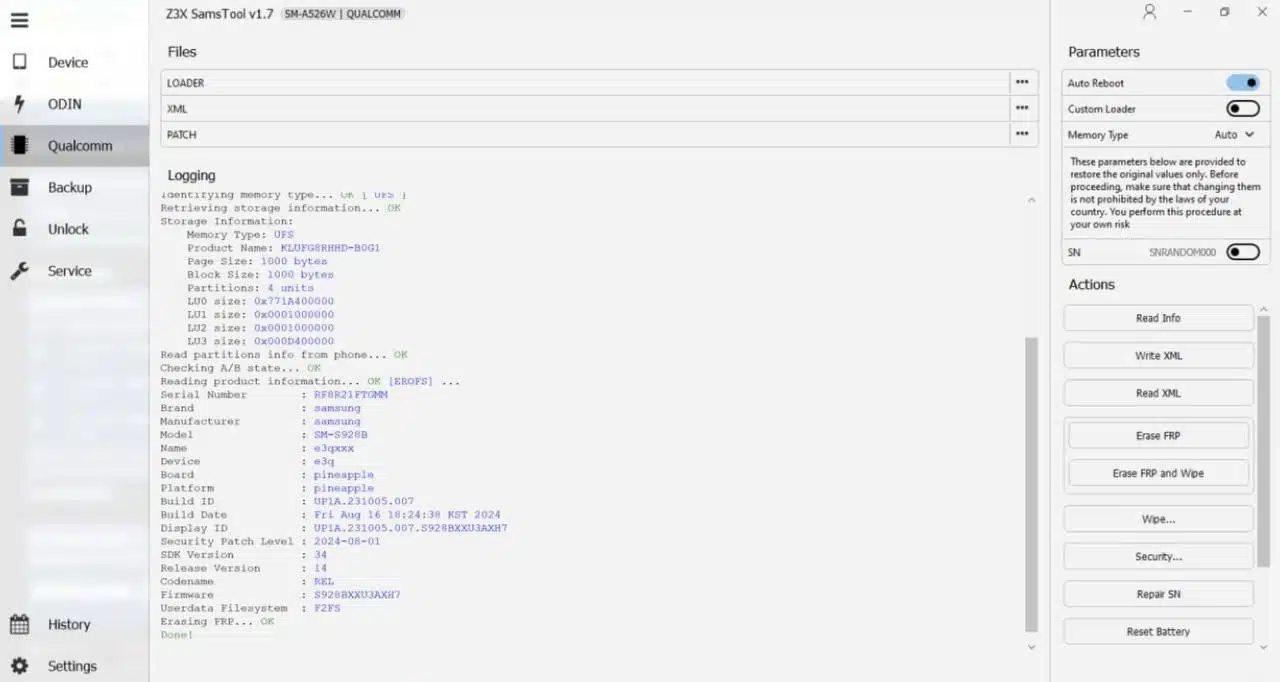
Z3x samstool professional samsung tool for frp remove imei repair and csc change
Supported Chipsets Exynos Mtk Unisoc And Qualcomm
Four Chipsets. One Tool. That’s The Headline Here And It’s Genuinely Rare In This Category. Exynos Covers Samsung’s In-house Processors Used In Flagship And Mid-range Models Across Europe And Asia. Mtk Handles Mediatek-powered Budget And Mid-range Samsung Devices That Show Up Constantly In Repair Queues. Unisoc Covers Entry-level Samsung Models That Have Taken Over Emerging Markets In Recent Years.
Qualcomm Handles Snapdragon Variants — Mostly North American And Select Asian Market Devices. The Same Samsung Model Often Ships With Different Chips In Different Regions Which Means Your Tool Needs To Handle Multiple Architectures. Samstool Eliminates That Problem Entirely With All Four Chipsets Covered Under One Platform. No Switching Between Tools Depending On What Chip Is Hiding Inside The Device.
Imei Mac And Certificate Repair Features
Imei Corruption Stops Everything Dead. No Imei Means No Network And The Device Is Basically A Paperweight Until It’s Properly Fixed. Getting It Wrong Makes Things Significantly Worse And Generic Baseband Patches On Samsung Hardware Are Unreliable At Best. Samstool Handles Imei Repair With A Dedicated Function Built Specifically For Samsung’s Implementation Across All Four Supported Chipsets.
Repair Imei And Repair Mac
Repair Imei Restores Primary And Secondary Imei Numbers After Flash Corruption Or Hardware-level Repair Damage. Repair Sn Handles Serial Number Restoration For Similar Post-repair Identifier Issues On The Same Device. Repair Mac Fixes Wifi And Bluetooth Mac Address Corruption A Separate Problem That Frequently Appears Alongside Imei Issues. In My Experience These Three Functions Together Handle The Overwhelming Majority Of Identifier-related Samsung Repair Scenarios Cleanly.
Patch Certificate Read And Write
Certificates On Samsung Devices Control More Than Most Technicians Expect Going Into A Repair. A Corrupted Or Invalid Certificate Causes Network Failures Security Errors And Prevents Certain Features From Functioning At All. Read Certificate Pulls Current Data For Inspection Before Touching Anything And Write Certificate Pushes Corrected Data Back. Patch Certificate Applies Targeted Fixes For Invalid Certificate States The Most Common Scenario Being Post-flash Certificate Corruption On Exynos And Qualcomm Models.
Frp Reset And Network Factory Reset
Frp On Samsung Is Trickier Than On Most Android Devices Out There. Knox Integration Means It Sits Deeper In The Firmware Than Standard Implementations And Approaches That Work On Other Brands Bounce Off Samsung’s Version. Samstool’s Reset Frp Function Handles This Across All Four Supported Chipset Families. Broad Coverage That Matters When You Don’t Know What Chip Is Inside Before You Open The Tool.
Network Factory Reset Is Different From A Standard Wipe And Worth Understanding Properly Before Using It. It Clears Network Configurations At A Deeper Level Than What A Factory Reset Achieves Through The Settings Menu. Carrier Remnants Network Registration Data Apn Configurations Things That Sometimes Survive A Standard Reset And Cause Ongoing Connection Issues Afterward. Read Codes Online Rounds This Out By Pulling Unlock Codes And Network Data Directly From Samsung’s Infrastructure.
Bootloader Unlock Relock And Csc Change
Samsung’s Bootloader Situation Is Genuinely More Complicated Than Most Other Android Devices. Unlocking It Trips The Knox Warranty Bit A Permanent Flag That Affects Knox-dependent Features And Enterprise Functionality Going Forward. Samstool Gives You Clean Control In Both Directions Unlock Bootloader When You Need It And Relock Bootloader When The Job Is Done. Client Gets Their Device Back In A Secure Stable State Without Leftover Flags From The Repair Process.
Csc Change Saves A Specific Type Of Job That Almost Nothing Else Handles Cleanly In Practice. Csc Controls Region-specific Features Carrier Branding And Certain Network Behaviors That Cause Real Problems When A Device Is Used Outside Its Original Market. Samstool Fixes This Directly And Sw Change Adds Software Version Management Running Alongside It. Complete Regional Configuration Control In One Place With No External Tools Required Whatsoever.
Advanced Functions — Eub Mode And Partition Manager
Switch To Eub Mode And Easy Partition Manager
Eub Mode Emergency Usb Boot Is A Low-level Samsung Diagnostic State That Most Technicians Never Think About Until They Desperately Need It. Usually That Moment Arrives When A Device Won’t Respond Through Any Normal Connection Method At All. Samstool’s Switch To Eub Mode Button Handles This Directly From The Interface Without Manual Button Combinations Or Any Guesswork. Easy Partition Manager Then Gives You A Structured Interface For Samsung Partition Management Without Needing Separate Tools Or Command-line Work.
Set Kg State Remove Warnings And Read Codes
Knox Guard Is Genuinely Misunderstood By A Lot Of Technicians Working On Samsung Devices Daily. It’s Samsung’s Enterprise Device Management System And A Kg-locked Device Needs Specific State Management To Function Outside Its Original Managed Environment Properly. Set Kg State In Samstool Handles This Specifically And Remove Warnings Clears On-screen Flags That Appear After Certain Operations. Read Codes Pulls Available Service And Unlock Codes From The Device For Complete Network Unlock Workflows.
Network Unlock And Regional Lock Removal
Network And Regional Locks Represent A Significant Portion Of Samsung Repair Volume In Most Shops. Particularly For Technicians Handling Imported Devices Or Carrier-locked Handsets Coming In From Different Markets Regularly. Samsung’s Lock Implementation Is Tight Woven Into Csc And Modem Configuration In A Way That Makes Standard Unlock Approaches Unreliable On Newer Models. Generic Unlock Methods That Work Perfectly On Other Brands Simply Don’t Apply Here.
Samstool’s Unlock Network And Regional Locks Function Works Across The Full Supported Chipset Range Cleanly. Pair This With Read Codes Online And Csc Change And You’ve Got A Complete End-to-end Workflow For Network-locked Samsung Devices. More Jobs Completed In-house Means Better Margins And Faster Turnaround For Waiting Clients. That’s A Practical Business Argument For Having Samstool Permanently Installed On Your Workstation.
Firmware Update Repair Boot And Battery Reset
Firmware Management Is Somewhere Samstool Adds Real Value Beyond What Basic Repair Tools Typically Offer. Update Firmware Handles Official Firmware Installation Directly Through The Platform Keeping Version Management Properly Organized. It Reduces Post-flash Instability From Version Mismatches A Detail That Matters Enormously When You’re Doing High Volume Samsung Work Daily. Not Exciting But Critically Important When Something Goes Wrong With A Client Waiting.
Repair Boot Handles Boot Partition Corruption After A Failed Flash One Of Those Problems That Turns A Simple Job Complicated Extremely Fast. Having It Built Directly Into Samstool Means Addressing It Immediately Without Mid-job Tool Switching To Something Else. Reset Battery Status Clears Inaccurate Battery Percentage Readings After Battery Replacement Or Extended Storage Periods. Small Finishing Detail But Clients Consistently Ask About Battery Percentage After A Repair More Than You’d Expect.
Backup Read Write And Store Restore
Backup Functions Should Be The Very First Thing You Check In Any Repair Tool You Use. Most Technicians Only Think About Them After Something Has Already Gone Wrong Which Is Exactly The Wrong Time To Start. Samstool Builds Read And Write Backup Directly Into The Platform So Pulling A Complete Backup Before Any Major Operation Takes Only Seconds. Push It Back If The Job Goes Sideways And You’re Safely Back To Square One.
Store And Restore Backup Takes This Further With Structured Data Management For Organized Long-term Storage. For Shops Handling Repeat Clients Or Corporate Device Fleets This Is Genuinely Useful Every Single Day. Combined With Read And Write Certificate Samstool’s Backup Infrastructure Gives You A Level Of Data Safety Most Competing Samsung Tools Treat As A Complete Afterthought. It Isn’t One And Samstool Clearly Gets That Right.
Samstool Latest Version Download
Verify Your Source Carefully Before Downloading Anything Related To Repair Tools. Samstool Gets Cloned And Repackaged Constantly Same Name Completely Different File Unwanted Software Bundled Silently Inside. Download From The Official Source Or A Repair Community Where Members Actively Vet Uploads Before Sharing With Others. Check File Size Against What Others Report And Read Recent Comments Before Clicking Anything At All.
Once You Have The Right File Check The Changelog Before Installing Anything. Chipset-specific Updates For Unisoc And Newer Exynos Models Come Out Frequently As Samsung Pushes New Firmware Builds Regularly. Install Samsung Usb Drivers Before Connecting Any Device And Keep Samstool Consistently Updated Going Forward. A Version That Handled A Specific Model Perfectly Last Month Might Need An Update For The Latest Firmware Build Of That Exact Same Device Today.
Conclusion
Samsung Repair Isn’t Getting Simpler More Chipsets Tighter Knox Integration Faster Firmware Cycles Pushing Constantly. The Complexity Keeps Going Up And Most Tools Genuinely Can’t Keep Pace With It. Samstool Is One Of The Few That Actually Does Keep Pace. Exynos Mtk Unisoc And Qualcomm All Covered Under One Roof With No Compromises Made Anywhere.
Imei And Certificate Repair Frp Reset Network Unlock Bootloader Control Csc Change Eub Mode Partition Management Firmware Update Battery Reset And Proper Backup Infrastructure All In One Organized Platform. Download From A Verified Source Keep It Updated And Use It Only On Devices You Own Or Have Clear Written Authorization To Service. If Samsung Repair Is A Regular Part Of Your Daily Work Samstool Belongs On Your Workstation Permanently.
SamsTool v1.36
Download Link:: Usersdrive – Mediafire – 4shared – My.pcloud – Playbook – DropBox – Mega – Drive.Proton – Google Drive