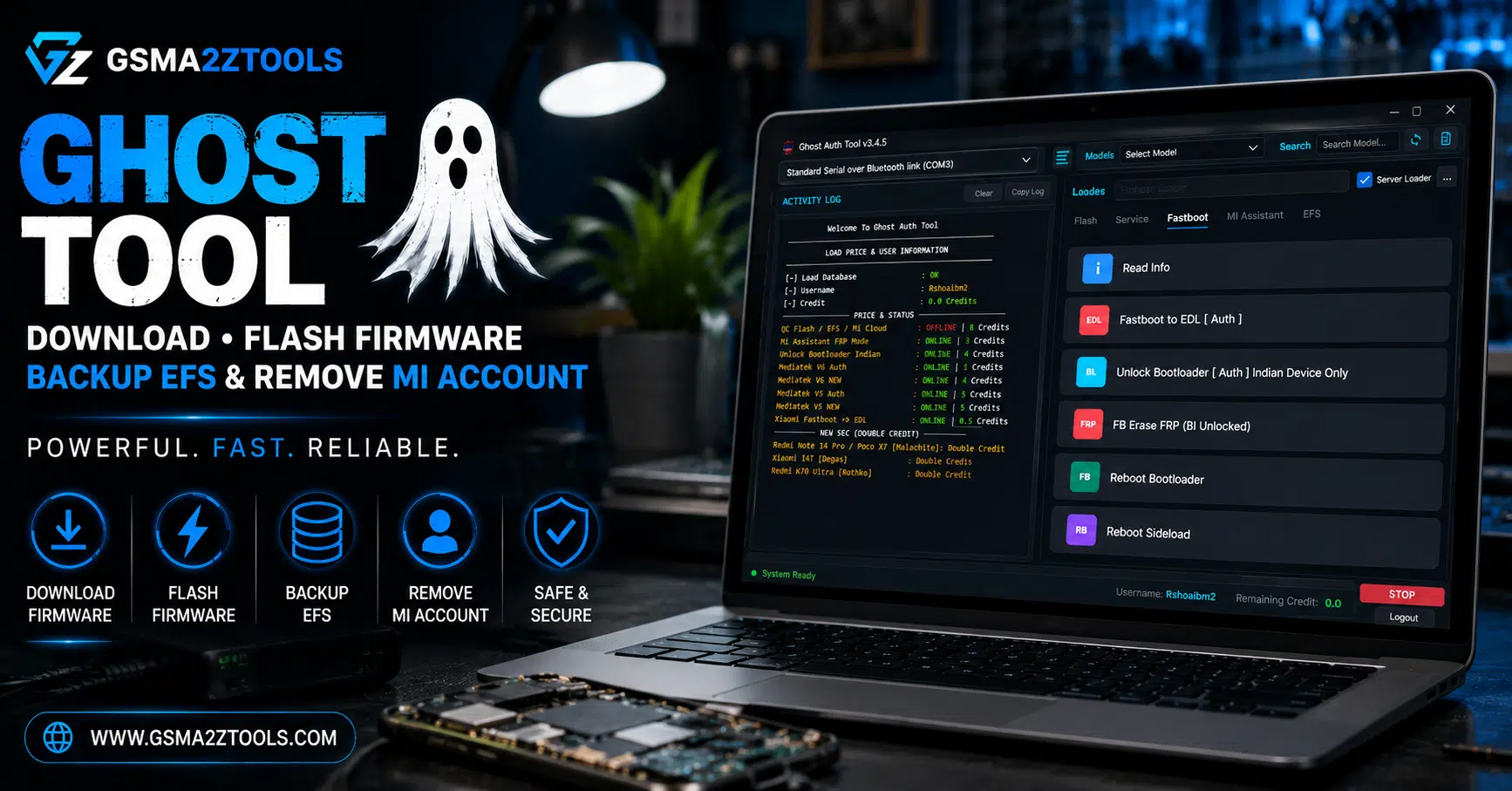
Ghost tool the most complete xiaomi and redmi repair software for downloading firmware flashing backing up efs removing mi account and bypassing frp. Powerful. Fast.
If You’ve Ever Been Stuck With A Xiaomi Phone That’s Locked By Mi Cloud Frozen On A Bootloop Or Showing An Frp Lock You Just Can’t Bypass You Know Exactly How Frustrating That Feeling Is. You Search For Hours Try Different Tools And Nothing Seems To Work The Way It Should. Whether You’re A Phone Repair Technician Or Just Trying To Fix Your Own Device The Struggle Is Real And The Wasted Time Adds Up Fast.
That’s Exactly Why Ghost Tool Was Built And Why This Guide Exists. In This Post We’ll Walk You Through Everything Ghost Tool Can Do From Loading Firmware Directly And Flashing With One Click To Cleaning Mi Cloud Disabling Mi Account Erasing Frp Backing Up And Restoring Efs And Even Unlocking The Bootloader Through Fastboot. By The Time You’re Done Reading You’ll Know Exactly How To Use Every Feature Like A Pro And Get Your Xiaomi Device Fully Working Again In The Least Amount Of Time Possible.
What Is The Ghost Tool
Ghost Tool Is A Professional Windows-based Repair Utility Designed Specifically For Xiaomi And Redmi Devices. It Brings Together All The Essential Repair Operations Firmware Flashing Mi Cloud Removal Frp Bypass Bootloader Unlocking And Efs Management Into One Clean Tabbed Interface. Instead Of Juggling Multiple Programs For Different Tasks You Work From A Single Dashboard That Covers Everything.
What Sets Ghost Tool Apart From Tools Like Halabtech Halab Tech Tool Mr Auth Tool Or Xiaomi Bd Auth Tool Is How Well-rounded It Is. Most Competing Utilities Do One Or Two Things Well But Fall Short Everywhere Else. Ghost Tool Gives You A Complete Repair Workflow. Whether You’re Dealing With A Locked Bootloader A Corrupted Efs Partition Or A Stubborn Mi Account That Won’t Come Off This Tool Has A Dedicated Feature For It. It’s The Kind Of Software That Earns A Permanent Spot In Any Serious Repair Technician’s Toolkit.
Download The Ghost Tool Latest Version
Getting Ghost Tool On Your Pc Is Simple. Download The Latest Version From The Official Source Extract The Zip File And Run The Installer. The Setup Process Is Quick No Complicated Configuration Required. Just Follow The On-screen Steps And You’re Done In Under Two Minutes.
Before You Connect Any Device Make Sure Your Usb Drivers Are Installed Correctly. Without The Right Xiaomi Drivers Your Pc Won’t Recognize The Phone And None Of The Tool’s Features Will Work. Once Drivers Are In Place Plug In Your Device Open Ghost Tool And It Will Detect The Phone Automatically In Most Cases. That Auto-detection Alone Saves A Lot Of Back-and-forth Compared To Older Repair Utilities That Require Manual Port Selection Every Single Time.
Also Read
Key Features of Ghost Tool
The Service Tab Is The Core Of Ghost Tool. It Handles The Most Common Xiaomi Repair Tasks And Is Where Most Technicians Spend The Majority Of Their Time. Each Option Is Clearly Labeled And Does Exactly What It Says — No Guesswork Needed.
This Tab Covers Everything From Loading Firmware And Reading Partition Tables To Removing Mi Cloud Accounts And Erasing Frp Locks. It’s Organized Logically So You Can Move Through A Repair Workflow From Top To Bottom Without Jumping Between Menus. Once You Understand What Each Button Does Your Repair Speed Will Improve Dramatically.
Flash Tab
Firmware Folder — Select And Load Firmware Directly
This Option Lets You Browse To Your Firmware Folder And Load It Straight Into Ghost Tool. It Reads The Firmware Files Automatically — No Manual Renaming Or Extracting Required. It’s One Of The Smoothest Firmware-loading Experiences In Any Xiaomi Repair Tool Available Today.
Read Gpt
Read Gpt Scans The Device’s Partition Table And Displays Its Full Structure. Run This Before Any Major Operation So You Know Exactly What You’re Working With. It’s A Quick Diagnostic Step That Can Prevent Serious Mistakes Down The Line.
Backup
Always Back Up Before You Flash Erase Or Modify Anything. The Backup Feature Saves Your Device’s Current Partition State So You Can Restore It If Something Goes Wrong. It Takes Less Than A Minute And Can Save You Hours Of Recovery Work Later.
Erase — Wipes
The Erase Option Performs A Complete Wipe Of The Device. It Clears User Data Cache And Selected Partitions Depending On Your Settings. Use This When You Need A Fully Clean State Before Applying New Firmware.
Auto Reboot
After Any Operation Finishes Auto Reboot Restarts The Device Automatically. It’s A Small But Useful Feature That Keeps Your Workflow Moving Without Extra Manual Steps Between Each Task.
Flash Now
Flash Now Is The Main Action Button In The Service Tab. Once Your Firmware Folder Is Loaded And Your Device Is Connected One Click Starts The Flash Process. Ghost Tool Shows Real-time Progress Throughout So You’re Never Left Wondering Whether The Operation Is Still Running Or Has Silently Failed.
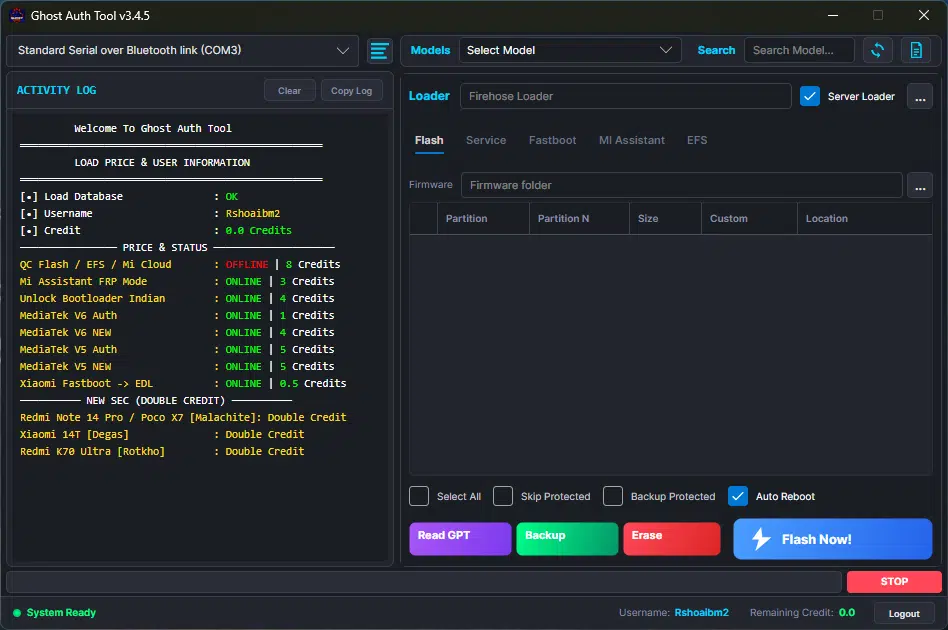
Ghost auth tool showing flash tab with read gpt backup erase and flash now options — supports qc flash mi assistant frp bootloader unlock mediatek v5/v6 and xiaomi fastboot to edl operations.
Service Tab
Mi Cloud Clean (Persist / Server)
Mi Cloud Clean Is One Of The Most In-demand Features In Any Xiaomi Repair Tool — And Ghost Tool Handles It Well. It Removes The Mi Cloud Account Lock That Appears After A Factory Reset When The Previous Owner’s Account Is Still Tied To The Device. Ghost Tool Offers Both Persist And Server Methods Giving You Flexibility Based On The Device Model And Android Version. For Many Technicians This Feature Alone Is Reason Enough To Choose Ghost Tool Over The Competition.
Erase Frp
Frp — Factory Reset Protection — Is Google’s Account Lock That Activates After An Unauthorized Reset. Ghost Tool’s Erase Frp Feature Removes This Lock Cleanly Letting The Device Boot Without Demanding Old Google Account Credentials. It Works Reliably Across A Wide Range Of Xiaomi And Redmi Models.
Mi Cloud Disable
Mi Cloud Disable Goes Beyond Just Removing The Account. It Disables The Mi Cloud Service Entirely On The Device. This Is The Right Option For Refurbished Phones Where You Need To Guarantee The Previous Owner Has No Remote Access Or Lock Capability Going Forward.
Mi Unlock + Reset + Frp
This Is A Combined Operation That Handles Mi Account Unlock Factory Reset And Frp Removal All In One Step. For Repair Shops Handling A High Volume Of Devices Daily This Single Button Replaces Three Separate Processes And Cuts Repair Time Significantly.
Factory Reset
A Standard Factory Reset That Wipes User Data And Returns The Device To Its Out-of-box State. Use This For General Cleaning Before Resale Or When Troubleshooting Persistent Software Issues That A Regular Reset From Settings Can’t Resolve.
Factory Reset + Frp
This Combines A Factory Reset With Frp Removal In A Single Operation. It’s Ideal For Devices That Need A Clean Wipe But Also Have An Active Google Account Lock That Needs To Be Cleared At The Same Time.
Enable Mi Account
After Certain Repair Operations The Mi Account Service Can Get Disabled Or Corrupted On The Device. This Feature Re-enables It So The Phone Can Connect To Xiaomi’s Ecosystem — Including Mi Cloud Mi Store And Related Services Without Any Issues.
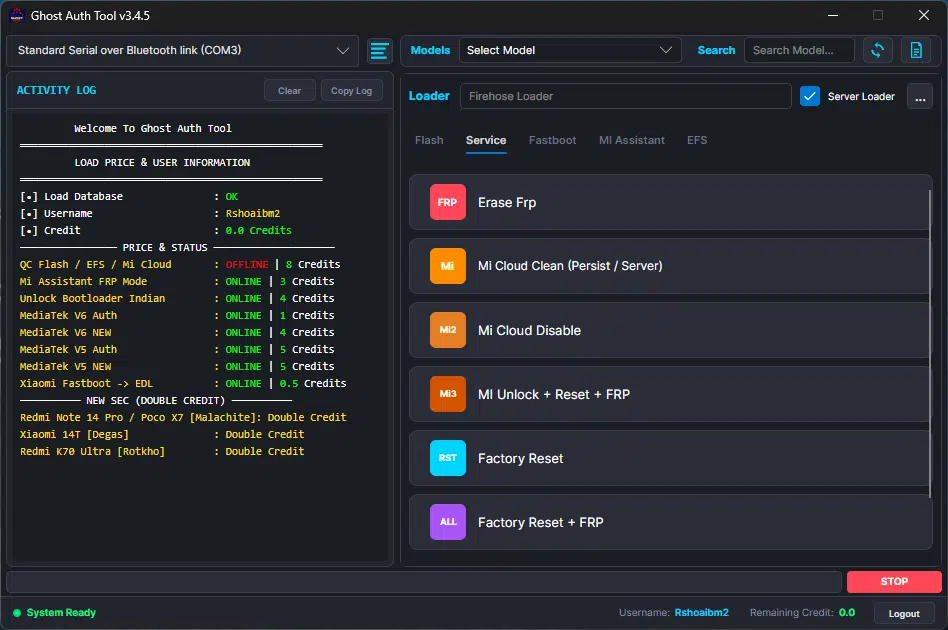
Ghost auth tool service tab showing erase frp mi cloud clean (persist/server) mi cloud disable mi unlock + reset + frp factory reset and factory reset + frp options for xiaomi and redmi device repair.
Fastboot Tab
The Fastboot Tab Handles Operations That Run While The Device Is In Fastboot Mode. This Is Where Deeper System-level Tasks Happen — The Kind That Need Direct Access To The Bootloader. If You’re Working On Locked Devices Or Need To Push Firmware At A Low Level This Is The Tab You’ll Be Using.
Every Feature Here Works With The Device In Fastboot Mode So Understanding How To Boot Your Xiaomi Device Into Fastboot Is A Prerequisite. Once You’re Comfortable With That This Tab Opens Up A Whole New Layer Of Repair Capabilities That Aren’t Available Through Standard Recovery Or Adb Methods.
Read Info
Read Info Pulls The Full Hardware And Software Details From The Device While It’s In Fastboot Mode. You Get The Model Number Bootloader Status Android Version Serial Number And More — All In One Screen. Always Run This First So You Know Exactly What State The Device Is In Before Taking Any Further Action.
Fastboot To Edl [Auth]
This Feature Pushes The Device From Fastboot Mode Directly Into Edl — Emergency Download Mode. Edl Is Used For Deep Flash Operations And Is Often The Last Resort When Standard Flashing Methods Fail Completely. The [auth] Requirement Means This Feature Needs Authentication Which Protects Against Misuse And Ensures Controlled Access.
Unlock Bootloader [Auth]
Unlocking The Bootloader Is A Necessary Step Before Installing Custom Roms Rooting Or Performing Certain Advanced Repairs. Ghost Tool Handles This With An Authentication Check To Keep The Process Secure. Once Unlocked A Much Wider Range Of Repair And Customization Options Become Available.
Fb Erase Frp (Bl Unlocked)
This Option Erases Frp Specifically On Devices That Already Have An Unlocked Bootloader. It’s A Targeted Operation That Works Differently From The Standard Frp Erase In The Service Tab And Is Designed For This Specific Device State.
Reboot Bootloader
Sends The Device Back Into Fastboot Mode From Its Current State. Useful When You Need To Switch Modes Quickly Without Physically Holding Down Button Combinations Every Time.
Reboot Sideload
Reboots The Device Directly Into Adb Sideload Mode. This Is Handy When You Need To Push An Ota Update Package Or A Recovery Zip Without Navigating Through The Full Recovery Menu Manually.
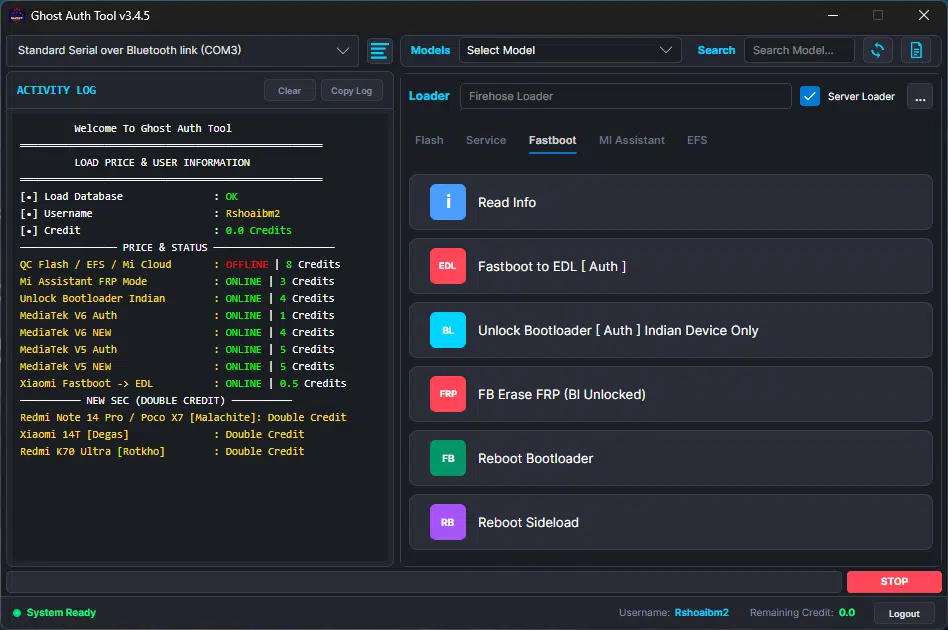
Ghost auth tool fastboot tab displaying read info fastboot to edl auth unlock bootloader auth indian device only fb erase frp for bl unlocked devices reboot bootloader and reboot sideload — complete fastboot repair solution for xiaomi and redmi devices.
Mi Assistant Tab
The Mi Assistant Tab Works With Devices Connected Through Xiaomi’s Mi Assistant Protocol A Separate Connection Method That Unlocks Additional Repair Options On Compatible Devices. Not Every Device Supports This Mode But For Those That Do It Offers A Reliable Alternative When Fastboot Methods Don’t Cooperate.
If You’ve Ever Run Into A Situation Where Standard Fastboot Frp Removal Just Doesn’t Stick On A Particular Model The Mi Assistant Tab Is Often The Solution. It Uses A Different Communication Pathway To The Device Which Means It Can Reach Areas That Other Methods Can’t.
Read Info
Reads Full Device Information Through The Mi Assistant Connection Model Details Imei Software Version And Current Account Status. It’s The Same Concept As Read Info In The Fastboot Tab But Accessed Through A Different Protocol.
Erase Frp [Auth]
Removes The Frp Lock Through The Mi Assistant Connection With Authentication. This Is The Go-to Method For Devices Where Fastboot Frp Removal Doesn’t Work Reliably. The Auth Requirement Keeps Usage Controlled And Legitimate.
Wipe Storage
Clears The Internal Storage Of The Device Through Mi Assistant. It’s A Deeper Clean Than A Standard Factory Reset And Is Useful For Devices Where You Need To Remove All User Data Beyond What Normal Reset Options Cover.
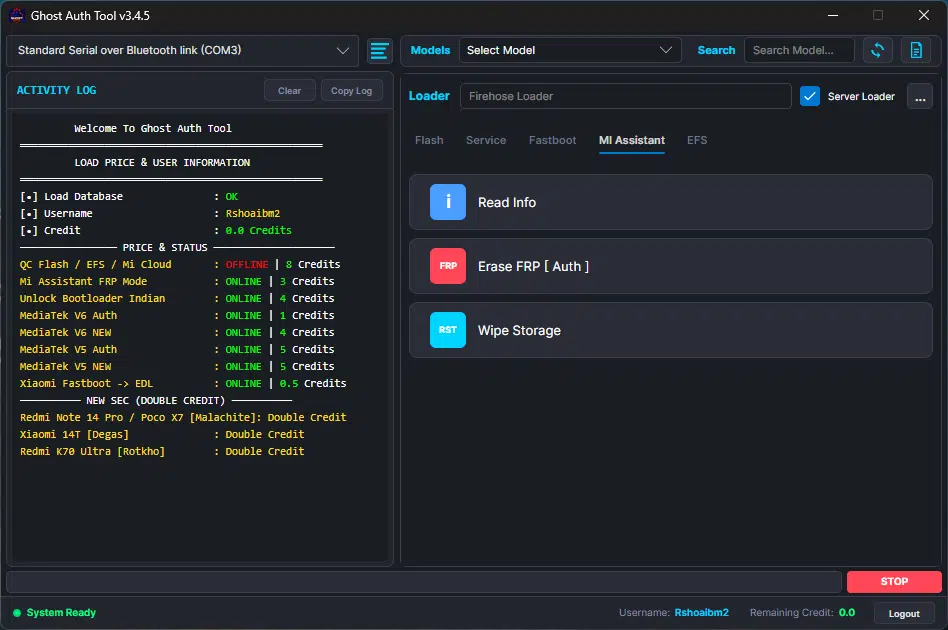
Ghost auth tool mi assistant tab showing three key operations — read info for device details erase frp auth for bypassing google account lock via mi assistant protocol and wipe storage for deep internal storage cleaning on xiaomi and redmi devices.
Efs Tab
The Efs Tab Is One Of The Most Important — And Most Underused — Sections In Ghost Tool. The Efs Partition Stores Your Device’s Imei Network Calibration Data And Other Core Hardware Identifiers. If It Gets Corrupted During A Failed Flash Or An Incorrect Erase Operation The Device Loses Its Imei Entirely And Can’t Connect To Any Mobile Network.
This Is The Tab That Can Save A Device That Looks Completely Dead From A Network Perspective. And It’s The Tab That Can Cause Serious Problems If Used Carelessly. Understanding What Each Option Does Before You Click Anything Here Is Not Optional — It’s Essential.
Backup Efs
Always Back Up Efs Before Doing Any Major Flash Operation. It Takes Seconds Costs Nothing And Can Save You From An Imei-loss Nightmare. Ghost Tool Saves The Entire Efs Partition As A File You Can Restore At Any Time. Make It A Habit To Run This Before Every Significant Repair.
Restore Efs
If A Device Has A Missing Or Corrupted Imei Restore Efs Pushes A Previously Saved Backup Back To The Device. This Is The Feature That Can Turn A No-signal Unregistered Phone Back Into A Fully Functional Device With A Working Imei And Network Connectivity.
Erase Efs
Erase Efs Wipes The Efs Partition Completely. This Is A Last-resort Option — Only Use It When You’re Ready To Immediately Restore From A Backup. It’s The Right Move When Efs Data Is So Corrupted It Needs To Be Fully Cleared Before A Clean Restore Can Work
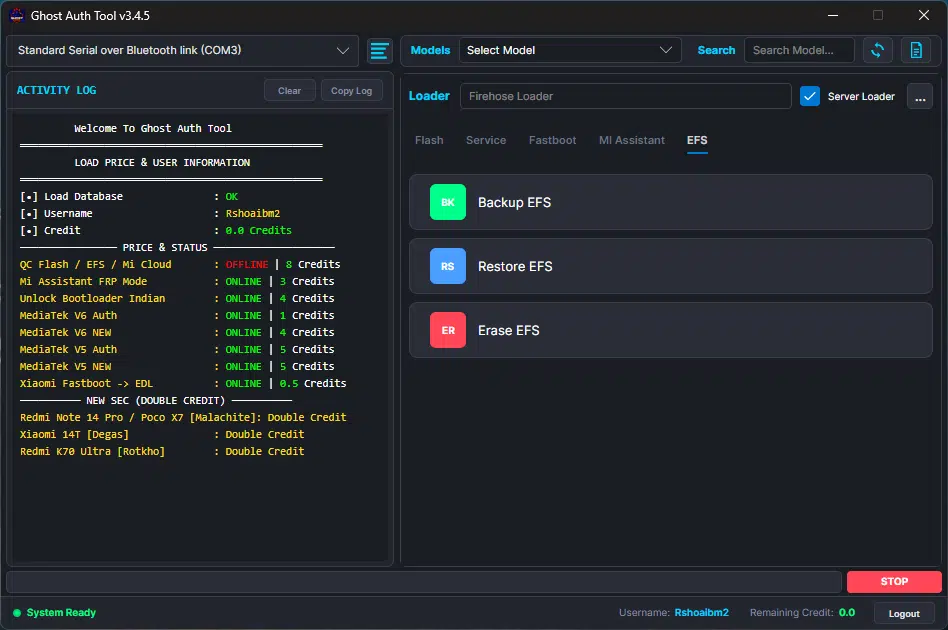
Ghost auth tool efs tab showing three critical imei and partition operations — backup efs to save partition data before flashing restore efs to recover lost or corrupted imei and erase efs for clearing damaged partition data on xiaomi and redmi devices.
Ghost Tool Vs Other Xiaomi Repair Tools
The Xiaomi Repair Tool Market Is Crowded. You’ve Got Halabtech Halab Tech Tool Mr Auth Tool Xiaomi Bd Auth Tool Topunlock And A Range Of Other Auth-based Utilities All Competing For The Same Space. So Where Does Ghost Tool Actually Stand?
Most Competing Tools Handle One Or Two Tasks Well. You Might Find A Great Frp Tool That Can’t Touch Efs Or A Decent Firmware Flasher That Has No Mi Cloud Support. Ghost Tool Covers The Full Spectrum Firmware Service Operations Fastboot Mi Assistant And Efs All In One Organized Interface. For A Repair Shop That Handles Dozens Of Xiaomi Devices A Week That Consistency Eliminates The Need To Switch Between Tools And Reduces The Chance Of Errors. The Clean Tab-based Layout Also Makes It Easier To Train New Technicians Because The Workflow Is Logical And Straightforward From The Start.
How To Get The Best Results With Ghost Tool
Using Ghost Tool Effectively Isn’t Just About Knowing Which Button To Press. A Few Habits Will Save You From Most Of The Common Mistakes That Trip Up Even Experienced Technicians.
First Always Back Up Efs Before Any Flash Operation. It Takes Ten Seconds And The Consequences Of Skipping It Can Mean Hours Of Recovery Work. Second Read Device Info Before You Start The Read Info Feature In Both Fastboot And Mi Assistant Tabs Gives You A Clear Picture Of What State The Device Is In. Third Match Your Firmware To The Exact Model. Flashing The Wrong Firmware Is One Of The Fastest Ways To Brick A Device And Ghost Tool’s Firmware Folder Feature Makes It Easy To Load The Right Files When Your Folder Is Organized By Model.
Final Verdict
Ghost Tool Is One Of The Most Complete Xiaomi Repair Utilities Available Right Now. It Covers Everything From Basic Firmware Flashing And Factory Reset To Advanced Operations Like Efs Backup And Restore Mi Cloud Removal Bootloader Unlocking And Frp Bypass — All In A Single Well-organized Interface That Doesn’t Require A Manual To Navigate.
For Technicians Who Handle Xiaomi And Redmi Devices Regularly Ghost Tool Isn’t Just A Convenience It’s The Kind Of Tool That Pays For Itself Within The First Week Of Serious Use. Download It Test It On A Real Device And You’ll Understand Immediately Why So Many Repair Professionals Rely On It Every Single Day.
Ghost Auth Tool V3.4.5
Ghost Auth Tool Credits Available! Click Here To Order On Whatsapp (Paid)
Download Link:: Usersdrive – Mediafire – 4shared – My.pcloud – Playbook – Google Drive – DropBox – Mega – Vexfile