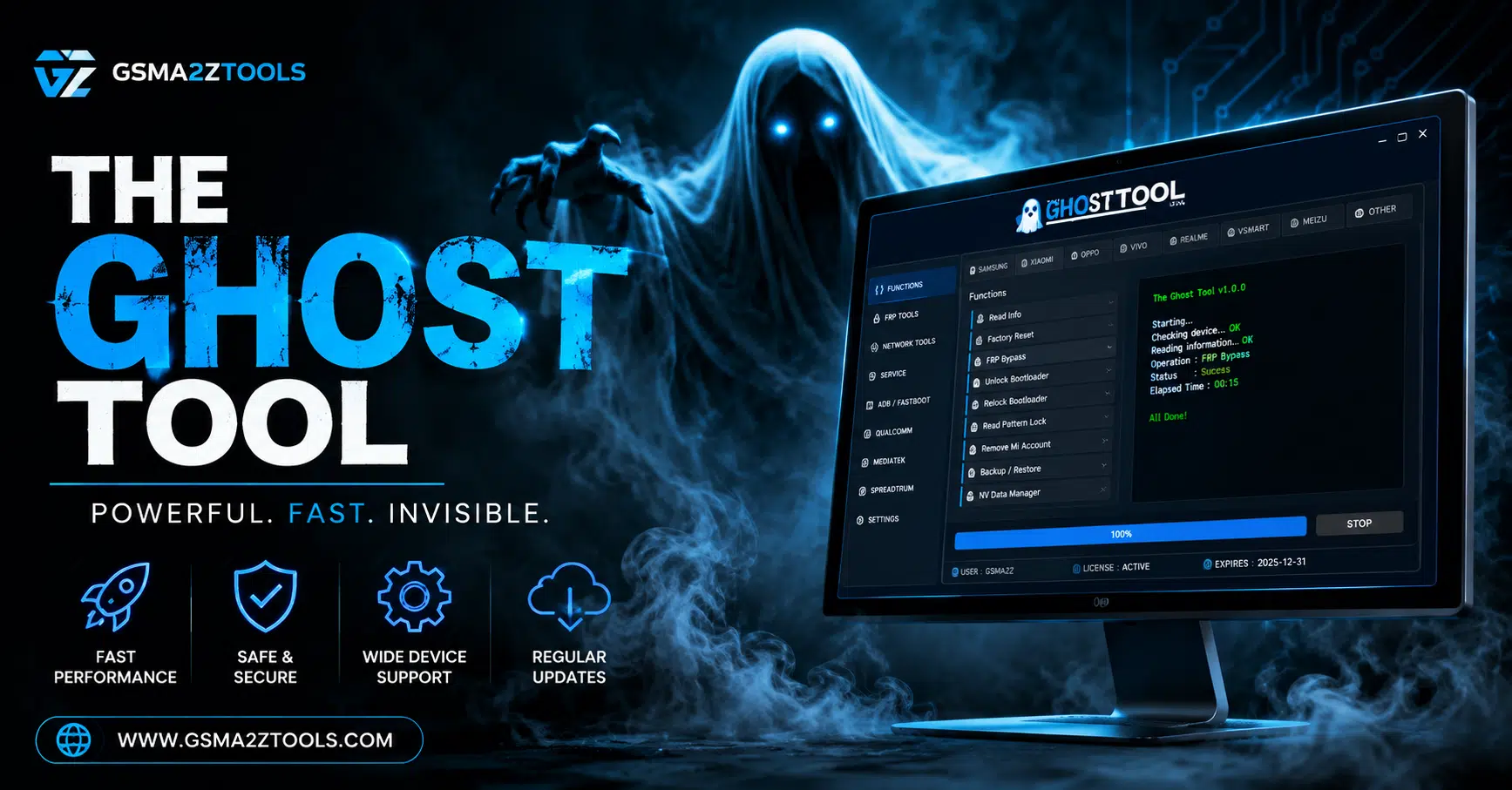
The ghost tool offers advanced flashing frp reset bootloader and mobile servicing functions in a powerful all-in-one platform.
If You’ve Ever Stared At A Locked Android Screen After A Factory Reset Desperately Trying To Get Past That Google Verification Wall You Know How Frustrating It Can Be. Maybe You Bought A Second-hand Phone Forgot Your Old Account Details Or Just Needed A Fresh Start And Suddenly You’re Completely Locked Out Of A Device You Own. That Helpless Feeling Is Exactly Why So Many People End Up Searching For The Ghost Tool.
Well You’re In The Right Place. In This Post We’re Going To Walk You Through Everything You Need To Know About The Ghost Tool What It Is What It Can Actually Do And How Mobile Technicians And Everyday Users Are Using It To Fix Frp Locks Flash Firmware Repair Imei And So Much More. Whether You’re A Seasoned Repair Pro Or A Complete Beginner By The End Of This Guide You’ll Have A Clear Picture Of Whether This Tool Is The Right Solution For Your Situation.
What Is The Ghost Tool?
The Ghost Tool Is A Windows-based Android Service Utility Developed By Nasser Al Fahad. It’s Designed To Handle One Of The Most Common And Annoying Problems In The Android World Factory Reset Protection (frp). When You Perform A Factory Reset On Any Android Device Google’s Frp Lock Kicks In Automatically. It Asks You To Verify The Previously Synced Google Account. If You Don’t Have Those Login Credentials You’re Completely Stuck. That’s Exactly Where This Tool Steps In And Saves The Day.
But Here’s The Thing It Isn’t Just An Frp Bypass Tool. Think Of It As A Full-service Android Unlock Software Suite. It Supports Samsung Xiaomi Lg Motorola And Devices Powered By Qualcomm And Mediatek Chipsets. You Can Remove Frp Locks Repair Imei Numbers Flash Firmware Reset Mi Cloud Locks Unlock Bootloaders Fix 4g And Volte Settings And Even Remove Bloatware. In Fact It Covers So Many Repair Functions That Most Professional Mobile Technicians Use It As Their Primary Daily Tool. And Unlike Older Solutions It Fully Supports Android 14 And Android 15 Which Means It Stays Relevant With Even The Newest Devices On The Market.
| Feature | Description |
| FRP Bypass | Remove Google Account Lock Via Mtp Adb Download Mode Edl & Fastboot On All Major Brands |
| Firmware Flash | Flash Stock Firmware Using Odin (Samsung) Edl (Qualcomm) Mi Flash (Xiaomi) And More |
| IMEI Repair | Read And Write Imei Repair Baseband Fix Network Registration On Qualcomm & Mtk Devices |
| Mi Cloud Reset | Bypass Xiaomi Mi Cloud Lock Via Adb Fastboot Edl — Including Anti Relock Protection |
| Bootloader Unlock | Unlock Or Relock Bootloader On Vivo Xiaomi Samsung And Other Supported Brands |
| 4G / VoLTE Fix | Read / Write Lte Bands Fix 4g After Sim Replacement Enable Volte On Samsung Mtk & More |
| MDM Removal | Bypass Mdm Knox Disable Remove Device Admin On Samsung And Other Enterprise Devices |
| ADB Tools | Run Adb Commands Enable Diag Mode Install Magisk Remove Bloatware Capture Screenshots |
Key Features of The Ghost Tool
Samsung
Test Mode
MTP PORT
- MTP Read Information
- Reboot
- Factory Reset
- MTP Disable Knox
REPAIR
- Enable Secret Codes
- OPEN Diag VZW
- Fix 3G
FRP
- MTP Remove FRP (new)
- MTP Remove FRP
- MTP Remove FRP USA
- MTP Remove FRP QR Code
CSC Samsung
- Change_CSC
- Change_CSC 2
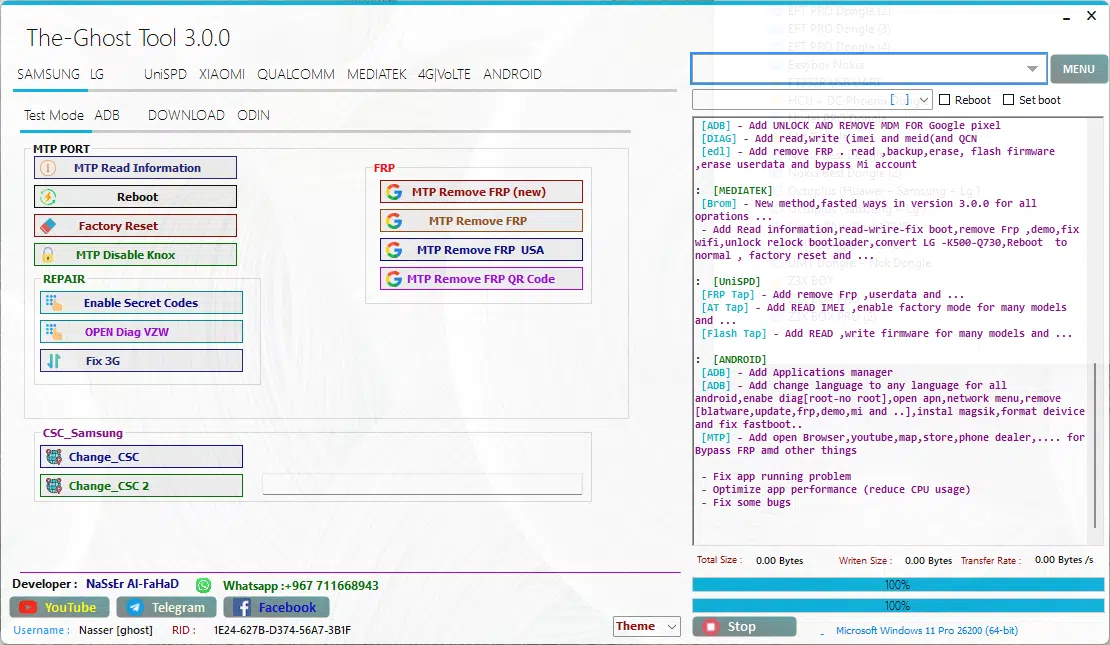
The ghost tool multi-brand support including samsung lg unispd xiaomi qualcomm mediatek 4g volte and android tabs with mtp frp removal factory reset reboot disable knox enable secret codes csc change and full adb download and odin mode servicing options.
ADB
Arabic
- Set Arabic
- Set Arabic No Theme
- Remove Arabic
- Install Arabic Keyboard
Remove Account
- ADB Frp (Old)
- ADB Frp (New)
- Remove Samsung Acc
Network
- Get List Supported CSC
- Enable Mobile Data Toggle
- HandFree, Wifi, 3G, Update
- ADB_Convert TO Verizon
System
- Delete Bloatwares
- Disable OTA Update
- Hide Developer Option
- Battery Information
- Alliance Shield X
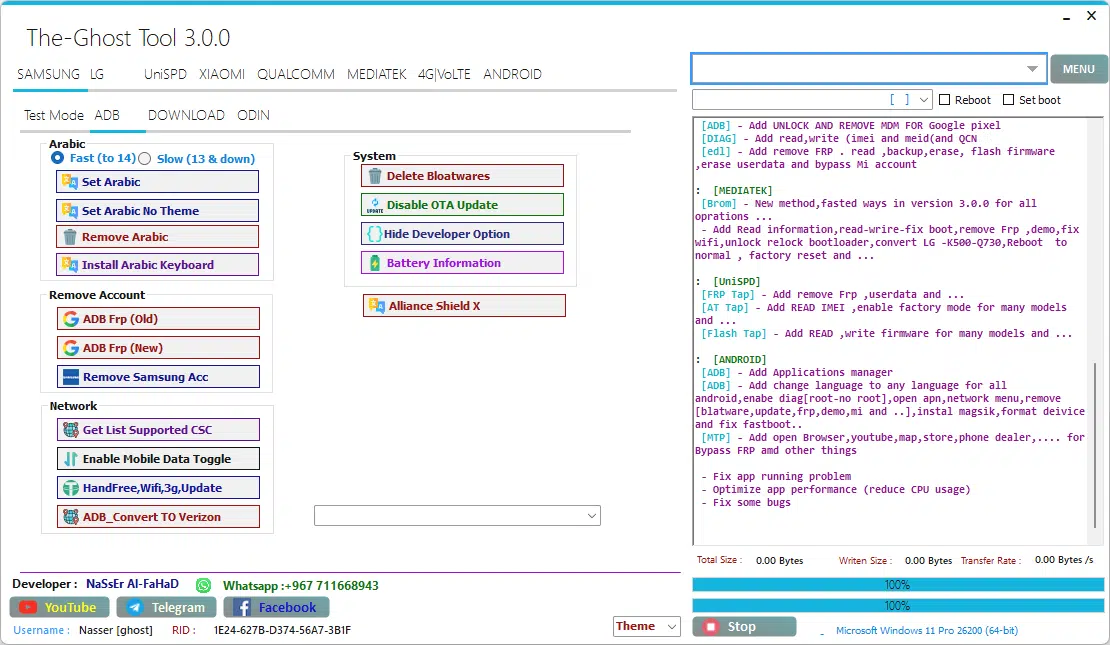
The ghost tool adb tab displaying arabic language settings remove account options including adb frp old and new and remove samsung account network tools like get list supported csc enable mobile data toggle handsfree wifi 3g update and adb convert to verizon plus system tools including delete bloatware disable ota update hide developer option battery information and alliance shield x.
Download
- Exit Download Mode
- Frp Android 5/6 (#1)
- Frp Android 5/6 (#2)
- SoftBrick Fix
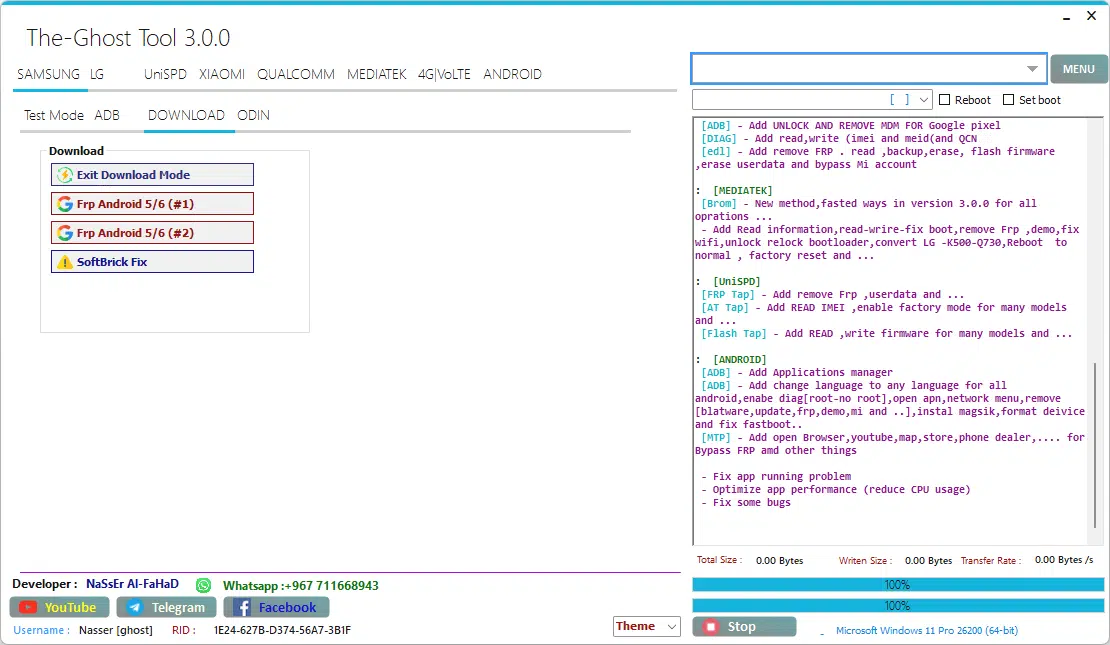
The ghost tool download tab — your go-to section for fixing frp-locked samsung devices running android 5 and 6 with two proven removal methods plus a softbrick fix to bring dead devices back to life.
ODIN
Odin Flash
- Recent (File Selection)
- BL (Bootloader) – Open
- AP (Application Processor) – Open
- CP (Modem/Radio) – Open
- CSC (Country/Carrier Code) – Open
- DATA – Open
Options:
- Reboot
- Check MD5
- NAND erase
- Flash
- Clear
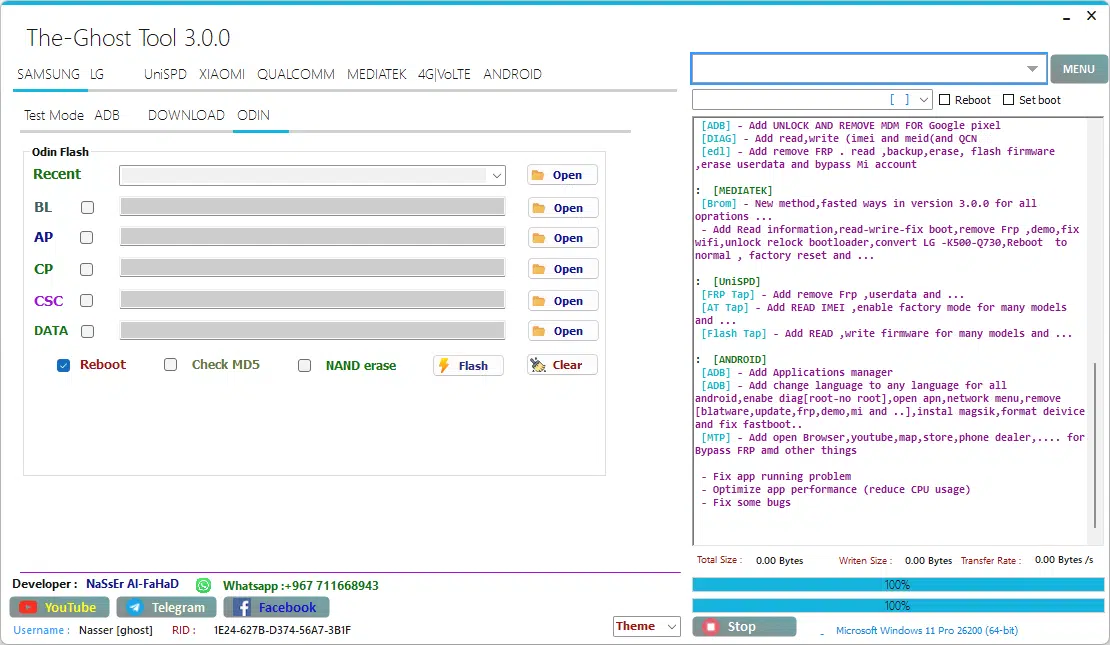
The ghost tool built-in odin flash tab — load your samsung firmware files across bl ap cp csc and data slots tick reboot or nand erase as needed and hit flash. Clean fast and all inside one tool without opening a separate odin window.
Lg
ADB
Commands
- Unlock Menu
- Unlock Stylo 4 Sprint (Old Sec)
- Unlock SPRINT (ADB)
- Change Carrier To Glopal
- Chnge Carrier To CDMA
- Fix Hand Free, Wifi, 3G, Update
- Start
Arabic LG
- Arabic TracFon (FAST)
- Arabic TracFon (FILLES)
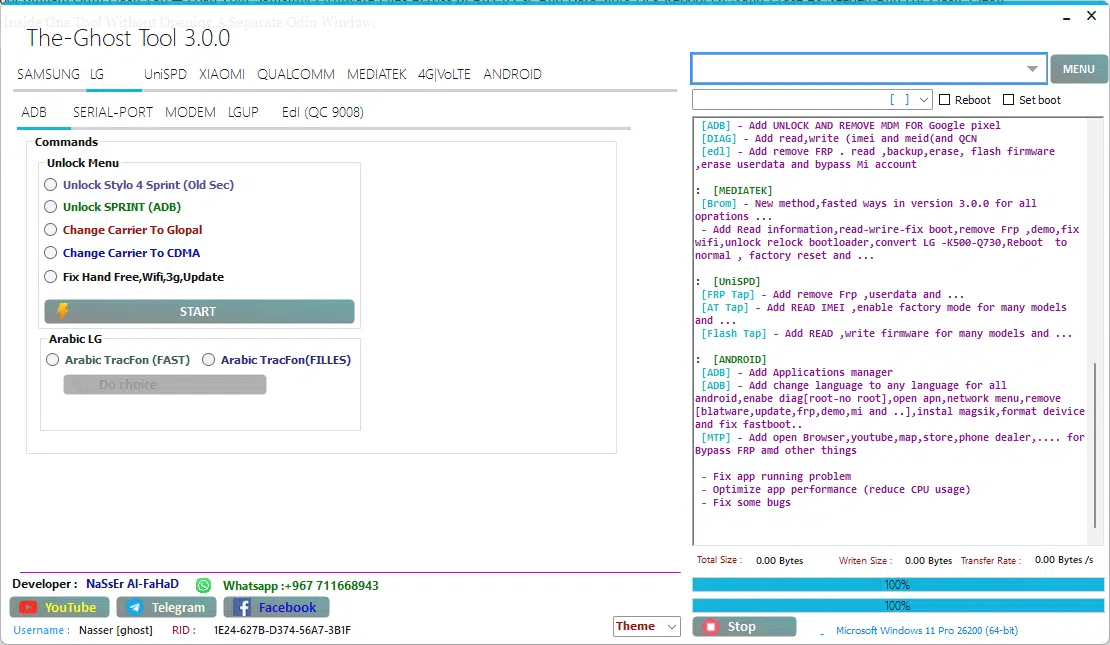
The-ghost tool lg tab displaying adb unlock commands including unlock stylo 4 sprint old sec unlock sprint adb change carrier to global change carrier to cdma fix handsfree wifi 3g update and arabic tracfon fast and filles options — full lg servicing coverage across adb serial port modem lgup and edl qc 9008 modes.
SERIAL-PORT
Port
- Read info LG
- MEID Repair
- Write IMEI
- Read QCN
- Write QCN
- Normal Mode
- Download Mode
- Factory reset
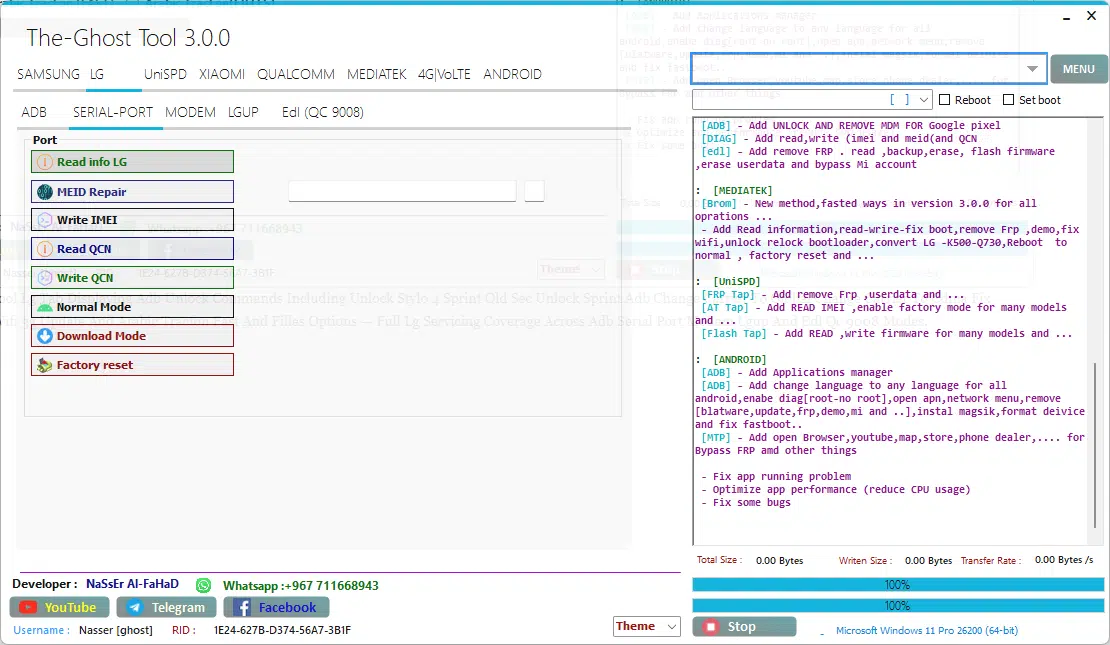
The ghost tool lg serial port tab — where real imei repair happens. Read device info fix meid write imei read and write qcn switch between normal and download mode and perform a factory reset — all through a direct serial port connection without any extra software.
MODEM
Commands
- Open HiddenMenu
- Enable Diag
- Skip ScreenLock
- Reset Modem
- Enable ADB
- Open LG Port
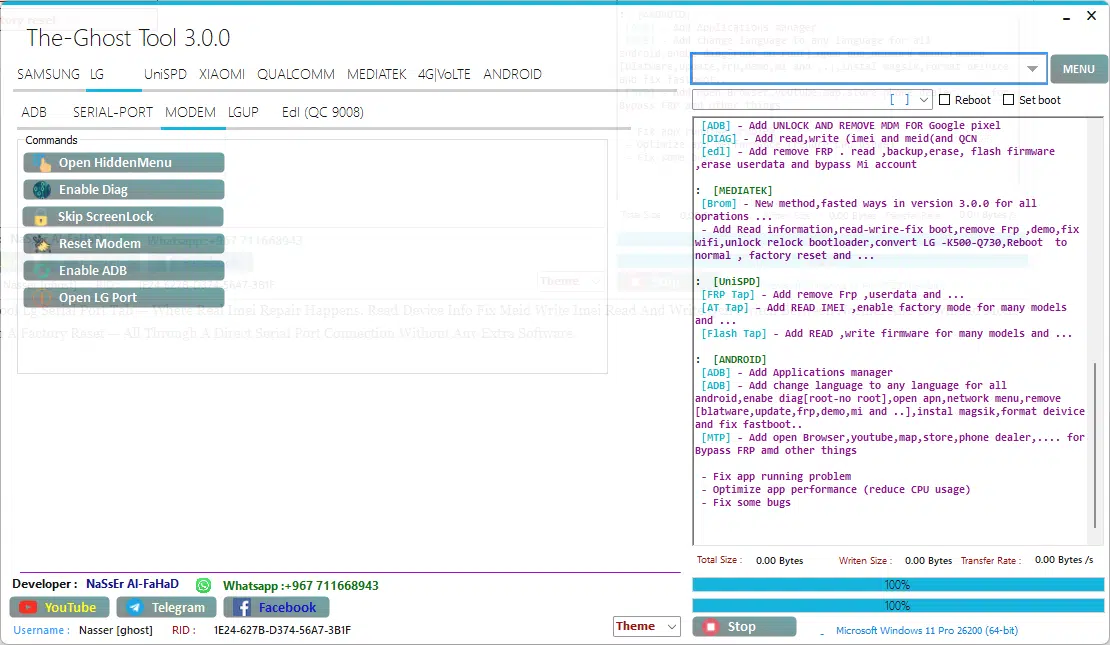
The ghost tool lg modem tab — six powerful commands in one place. Open the hidden menu enable diag mode bypass the screen lock reset the modem enable adb and open lg port — everything a technician needs for deep lg modem-level access without touching a single adb command manually.
Edl (Qc 9008)
- Choose Mode
- Remove FRP
- Factory reset
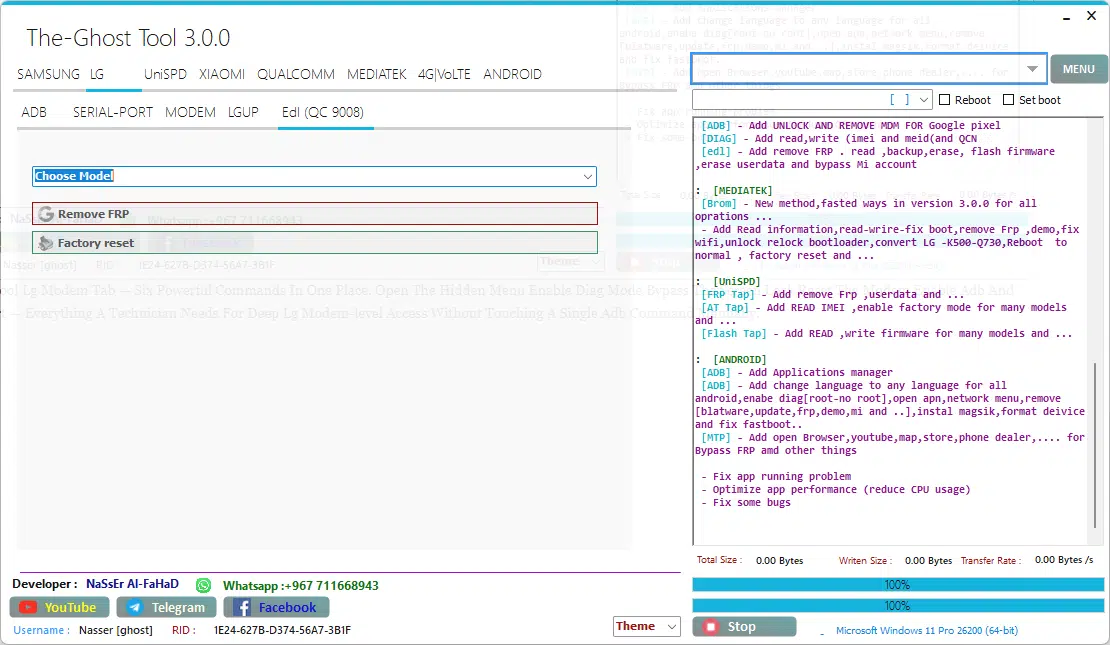
The-ghost tool lg edl qc 9008 tab — select your lg model hit remove frp or factory reset and let edl mode do the rest. Deep-level access for the toughest lg locks that adb and serial port simply can’t crack.
UniSPD
FRP
Operation
- RECOVERY WIPE DATA I + FRP
- RECOVERY WIPE DATA II + FRP
- RECOVERY FORMAT DATA + FRP
- RECOVERY WIPE APP DATA + FRP
- RECOVERY WIPE DATA ONLY + FRP
- ERASE DATA + FRP
- ERASE FRP ONLY
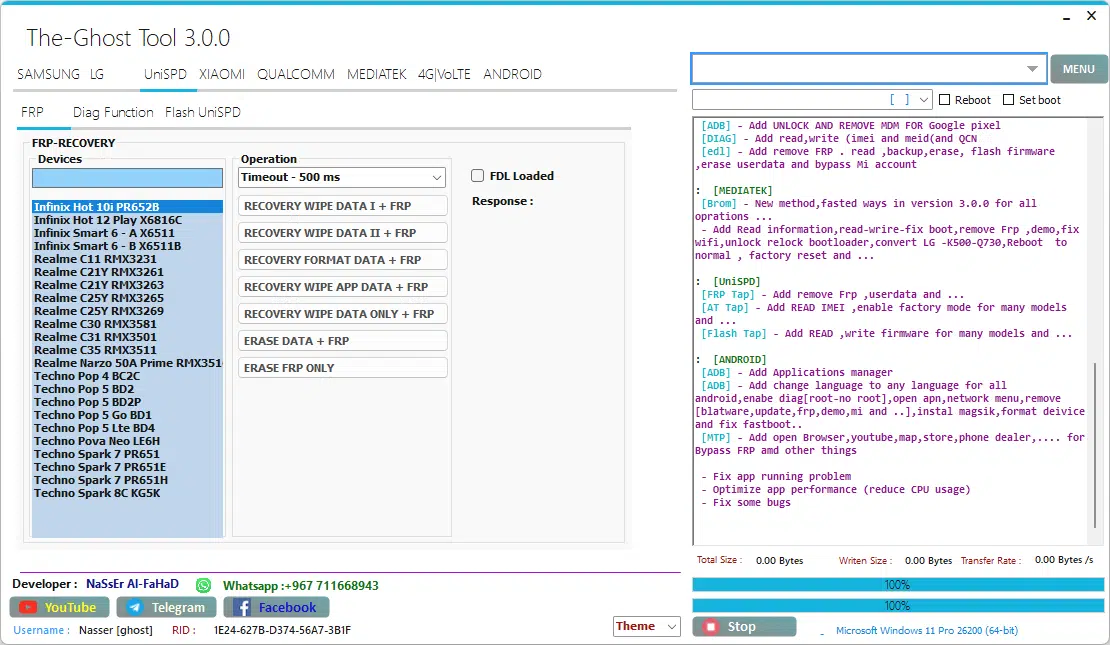
The ghost tool unispd frp recovery tab — supporting infinix realme and techno devices with seven targeted frp removal operations including recovery wipe data i and ii recovery format data recovery wipe app data recovery wipe data only erase data plus frp and erase frp only — all model-specific and ready to execute in seconds.
Diag Function
Action
- Start Connect
- Turn On Backlight
- Factory Reset
- Power Off
- Reboot
Options
- IMEI 1 / IMEI 2 (Read / Write)
- BT Addr (Bluetooth Address)
- Wi-Fi Addr (Read / Write)
- Init Phase Check
- SN 1 / SN 2 (Read / Write)
Extra
- AT Command (Send)
- Fast Connect (checkbox)
- Charging Battery (checkbox)
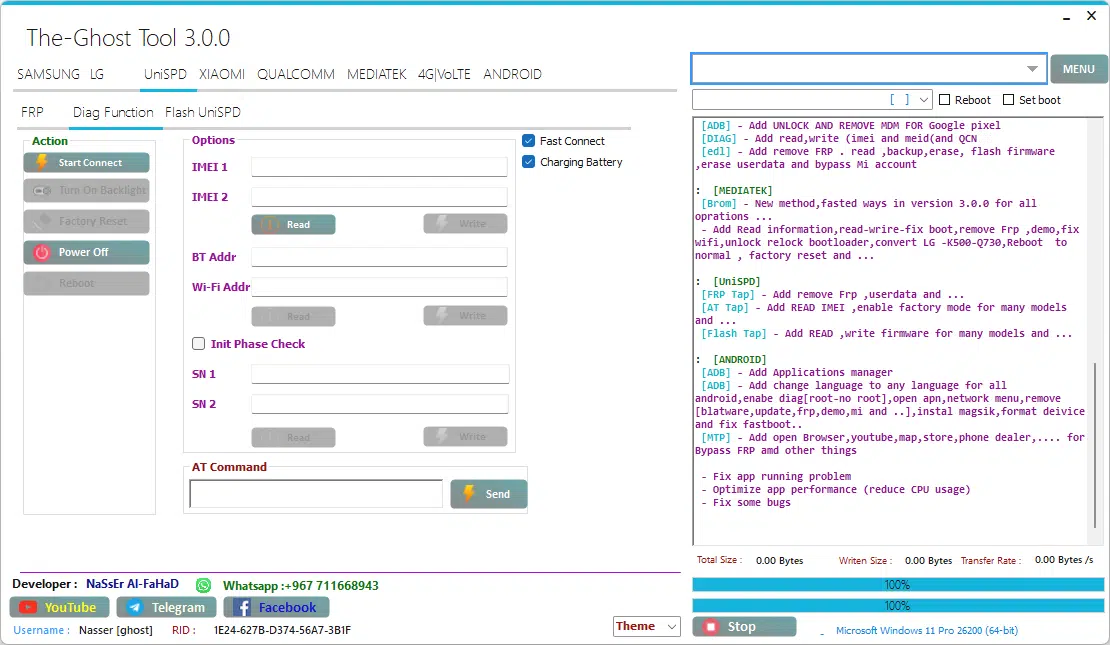
The ghost tool unispd diag function tab — connect your device read and write imei 1 and 2 grab bt and wifi addresses check serial numbers sn1 and sn2 send custom at commands and control the device with factory reset power off and reboot — all from one clean diagnostic panel.
XIAOMI
ADB
- Bypass Mi iCloud OS 8.1
- [ROOT] Enable Diag mode
- [Direct] Enable Diag mode
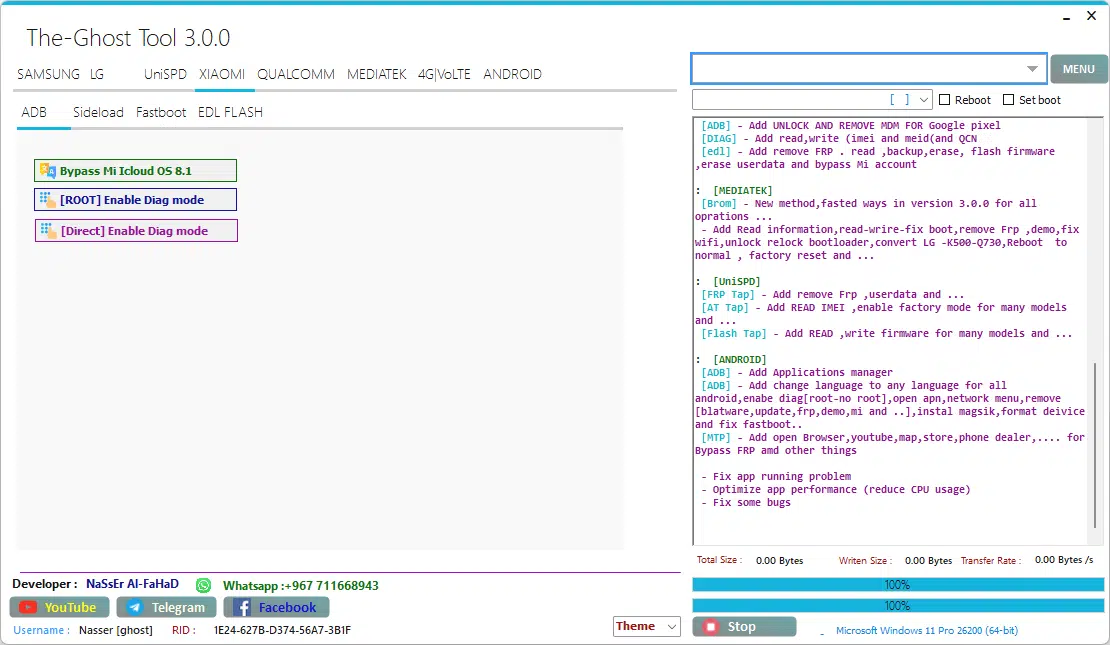
The-ghost tool xiaomi adb tab — bypass mi cloud on os 8. 1 enable diag mode via root or direct method and switch between adb sideload fastboot and edl flash modes for complete xiaomi device diagnostic and unlock coverage in one place.
Sideload
- Read offline MiCloud information
- Remove FRP
- Factory reset
- Reset MiCloud lock
- [QUALCOMM] Bypass MiCloud lock (Anti relock)
- [QUALCOMM] Bypass MiCloud lock
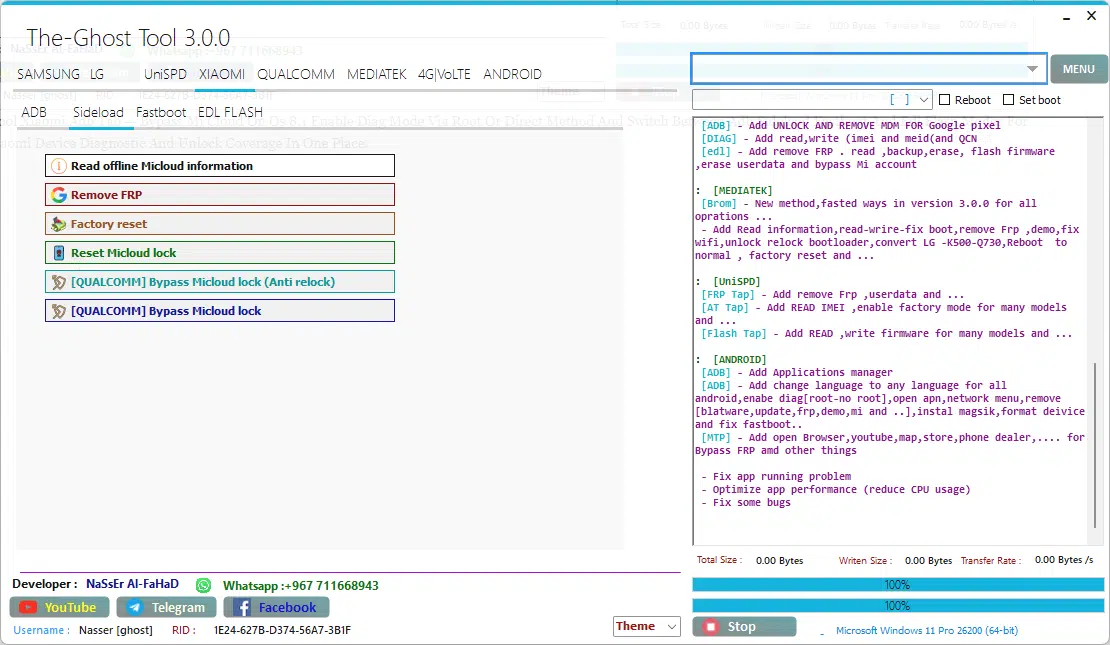
The ghost tool xiaomi fastboot tab — read offline mi cloud info remove frp factory reset reset mi cloud lock and bypass mi cloud lock with or without anti relock using two dedicated qualcomm methods — the most complete xiaomi fastboot unlock toolkit in one screen.
Fastboot
Command
- [UNLOCKED] Remove FRP
MI FLASH
- Reboot EDL [OLD]
- Reboot EDL [NEW]
- Reboot System
- Flash
- Read OEM
- Browse flash .bat file…
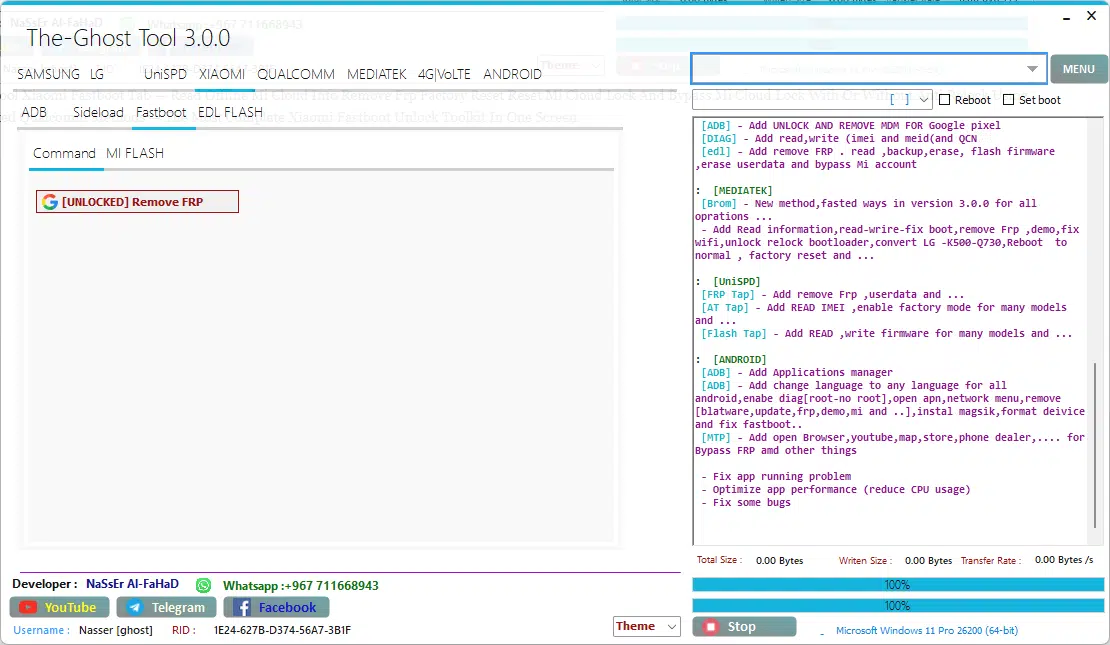
The ghost tool xiaomi edl flash tab — designed for bootloader unlocked xiaomi devices this tab gives you a direct unlocked remove frp option in edl mode plus a dedicated mi flash sub-tab for deep firmware flashing
Qualcomm
QCN
- Read QCN from Mobile
- Write QCN to Mobile
ADB
Unlock Menu
- Test Connection
- Start Unlock
- Unlock for Multi User
- Lock Back
- Uninstall Carrier Programs (test) OPTIONAL
- Return All Carrier Programs Back (test)
- MDM + Soft Unlock User
- Start
OTA Flash (From Recovery)
- adb reboot recovery
- OTA Flash (Only For Flash Ota From Recovery)
- Start
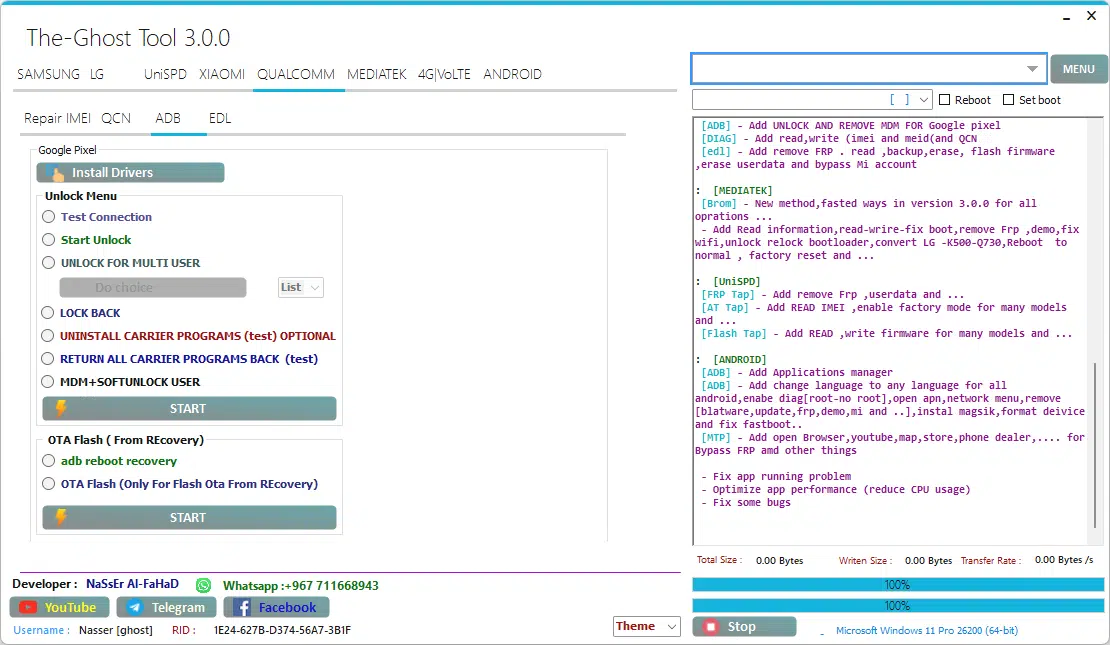
The ghost tool qualcomm adb tab — install google pixel drivers unlock single or multi-user devices remove mdm soft lock uninstall and restore carrier programs and flash ota updates directly from recovery — complete qualcomm adb unlock
Mediatek
- Generic FRP
- Erase userdata
- Samsung FRP
- FRP SAMSUNG [OEM]
- Erase [SAMSUNG LOST]
- Reset MiCLOUD
- Unlock Bootloader
- Relock Bootloader
- Auto Bypass
- Backup NV
- Restore NV
- Erase NV
- Read RPMB
- Erase RPMB
- Write RPMB
- Read phone Software information
- Convert LG [K500-Q730]
- Reboot to Normal
- Start
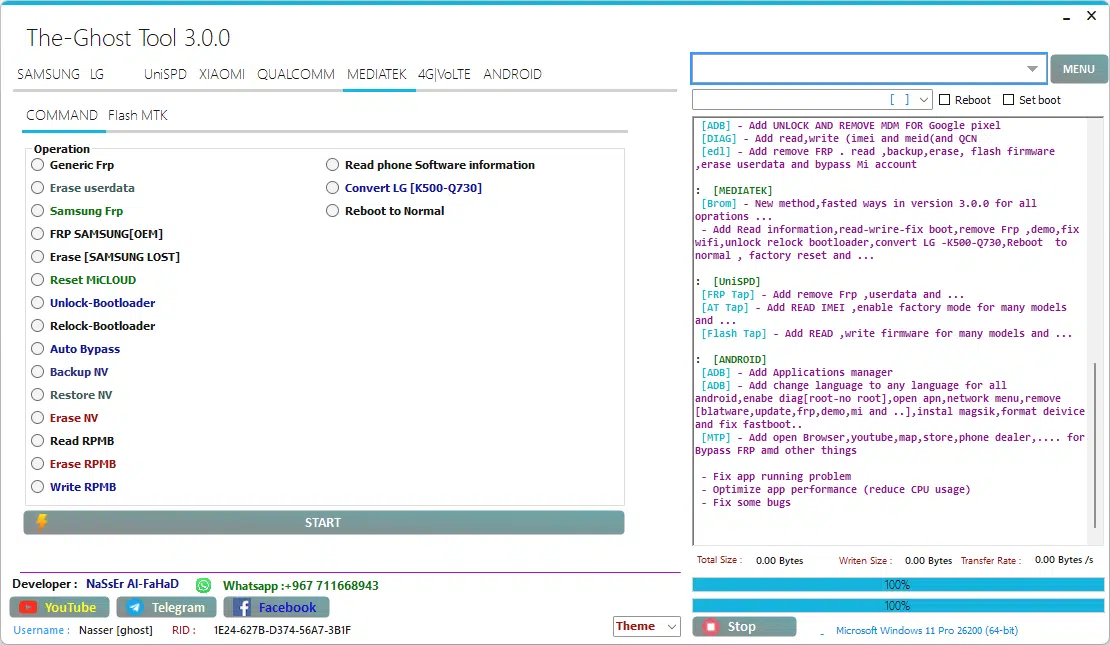
The ghost tool mediatek command tab — the most feature-packed section in the tool. From generic frp and samsung frp removal to mi cloud reset bootloader unlock and relock auto bypass nv backup and restore and full rpmb read erase and write
4G/VoLTE
4G
Network & Band Settings
- Auto 4g / Manual 4g Selection
- Enable Specific Bands (3, 20, 28 Shown)
- Option To Fix 4g When Replacing Sim (samsung-specific)
- Fix 4g For All 5g Android Devices
Authentication & Security
- Send Spc (000000 Default)
- Send Pwd (fffffffffffff Default)
- Send 16-digit Code
- Zero Spc (reset Security Code)
Carrier Policy Management
- Read Carrier_policy From Phone
- Edit Carrier_policy
- Write Carrier_policy Back To Phone
- Create Policyman Folder
Device Operations
- Delete 4g
- Enable Bands (3,20,28 Quick Option)
- Read 4m Phone
- Reboot Device
- Disconnect Port / Port On / Port Off
Control Buttons
- Start (to Execute Selected Action)
- Port Control Buttons: On / Off
- Send Spc / Send Pwd Execution
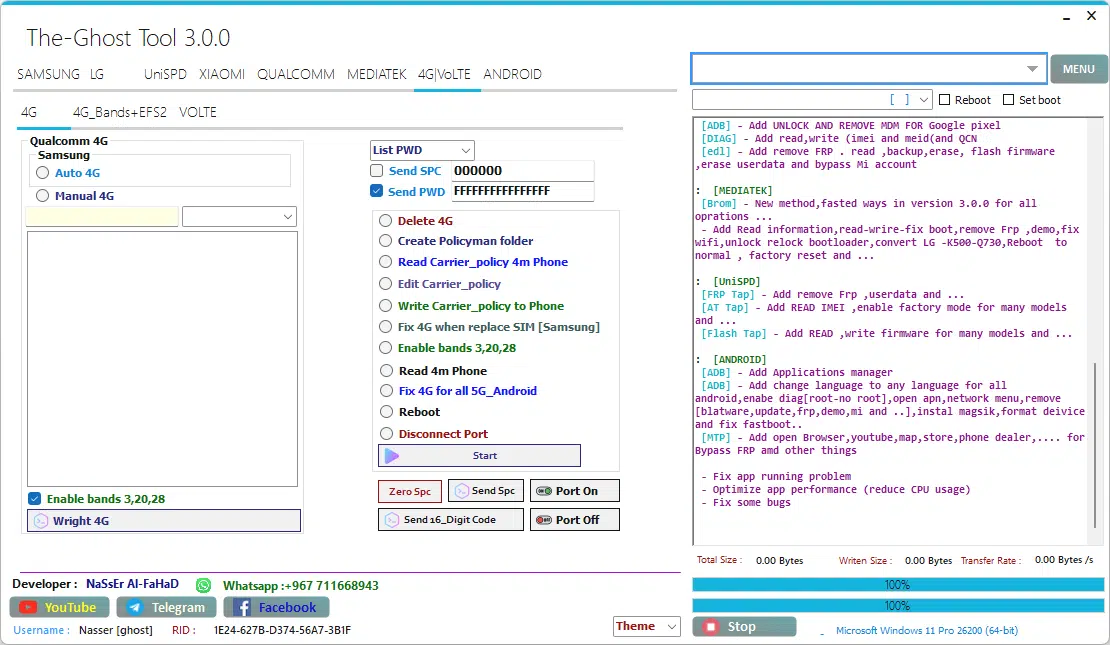
The-ghost tool 4g volte tab — fix missing 4g enable bands 3 20 and 28 send spc and pwd codes read and write carrier policy files create policyman folders and repair 4g on 5g android devices
4G_Bands + EFS2
Network & Band Management
- Read Lte Band
- Enable Bands (1, 3, 20, 28 Shown)
- Disable Enabled Bands
- Reset Settings 4g Back To Default (all Brands, 5g Included)
- Auto 4g / Manual 4g Selection
- Enable Specific Bands (3, 20, 28 Quick Option)
Carrier & Csc Policy
- Read 4g_csc From Phone
- Write 4g_csc To Phone
- Read Carrier_policy From Phone
- Edit Carrier_policy
- Write Carrier_policy To Phone
- Delete Carrier_policy
- Create Policyman Folder
- Delete Policyman Folder
- Backup Policyman Folder
- Restore Policyman Folder
Nv & Security
- Read Nv From Phone
- Write Nv To Phone
- Send Spc (000000 Default)
- Send Pwd (fffffffffffff Default)
- Send 16-digit Code
- Zero Spc (reset Security Code)
Device Operations
- Reboot Device
- Sim Slot Selection (sim-1 / Sim-2)
- Fix 4g After Sim Replacement (samsung & All Brands/5g)
- Fix 4g For All 5g Android Devices
- Delete 4g
Baseband Repair
- Fix Baseband Via Diag
- Fix Baseband Via Download
- Fix Baseband Via Fastboot
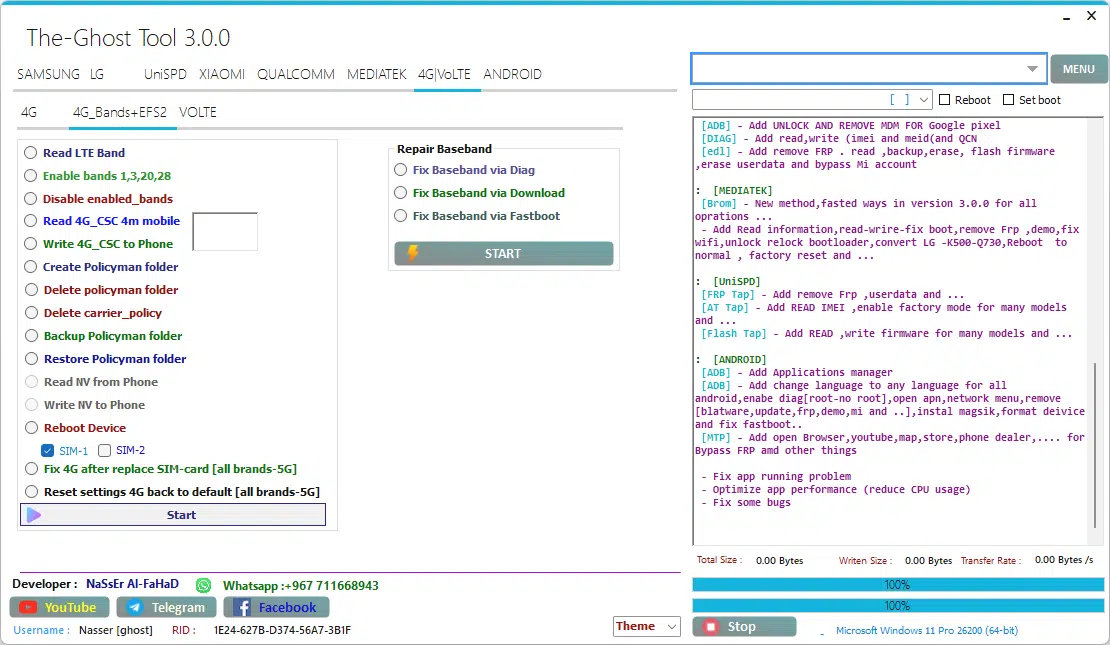
The ghost tool 4g bands efs2 tab — read and enable lte bands manage policyman folders read and write nv and csc data fix 4g after sim replacement on all 5g brands reset 4g settings to default and repair baseband through diag download or fastboot
VOLTE
- Enable / Remove VoLTE (select device options like Samsung, MTK, UniSPD, etc.)
- Open IMS Settings directly [Samsung]
- Open IMS Settings via secret code [Samsung]
- Open Engineer Mode via secret code [MTK]
- Open Engineer Mode via secret code [MTK+UniSPD]
- Open Engineer Mode via secret code [UniSPD]
- Enable VoLTE via Shizuku
- Open MTK Engineer mode directly
- Open Engineer Misc mode directly
- Open LG Hiddenmenu mode directly
- Open LG Hiddenmenu mode [modem]
- Enable VoLTE directly [Root]
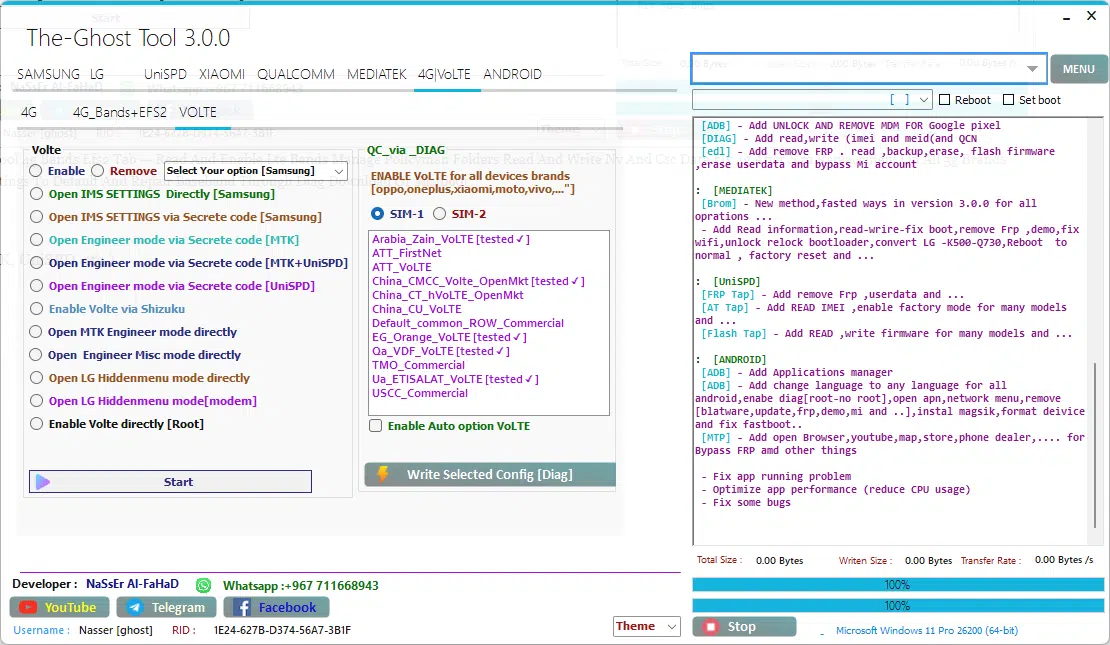
The-ghost tool volte tab — enable or remove volte on samsung open ims settings directly access engineer mode on mtk and unispd devices enable volte via shizuku or root open lg hidden menu and write carrier-specific volte configs via qc diag including arabia zain att china cmcc orange qa vdf tmo etisalat and uscc
Android
ADB
Information / Utility
- Read Info
- Read Info (New)
- Check Root
- Open Network Mode
- Open APN
- Screenshot capture
DIAG (Diagnostic)
- Diag No Root
- Super Diag No Root [Xiaomi]
- LT Diag
- Diag Need Root
- Diag QC [Oppo]
- Fix Hand Free, WiFi, 3G, Update
Repair Functions
- Reset EFS (Root)
- Backup EFS (Root)
- ADB Format
- Magisk Install
- Fix Waiting Debugger
- Coolpad Exit Fastboot Mode
Apps / Bloatware Management
- Remove Update Oppo
- Remove Update Vivo
- Remove Update Samsung
- Remove Bloatware Vivo
- Remove Bloatware Mi Global
- Remove Bloatware Mi CN
- Remove Bloatware Mi CN Global
- Uninstall Vivo Daemon Service
Accounts / FRP / Security
- Bypass FRP 2
- Bypass FRP 1
- Bypass Mi Cloud
- Sony Bypass Anti Theft
- Anti Relock MIUI Android 11, 12, 13
- Disable Mi CloudShot
Mi Cloud Anti Relock 1
Mi Cloud Anti Relock 2
Sign Out Mi (Root)
Bypass Mi Cloud OS 9, 10 (#)
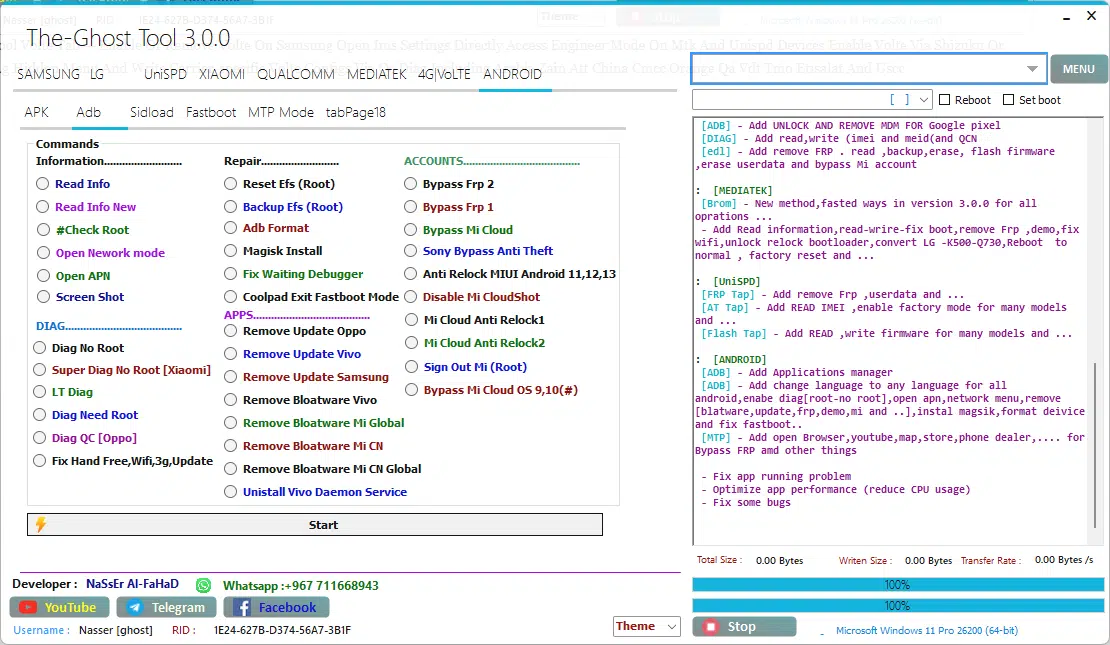
The-ghost tool android apk tab — the most comprehensive android servicing panel in the tool. Read device info run diag without root install magisk bypass frp and mi cloud remove bloatware from oppo vivo samsung and xiaomi backup and reset efs anti-relock miui on android 11 to 13 and handle mi cloud anti relock
Sidload
- Mi Assistant Mode Read Info
- Sideload Reboot to Normal
- Sideload Reboot to Recovery
- Mi Account Bypass or FRP 1
- Mi Account Bypass or FRP 2
- Disable Dm-Verity 1
- Disable Dm-Verity 2
- Universal Boot Patcher
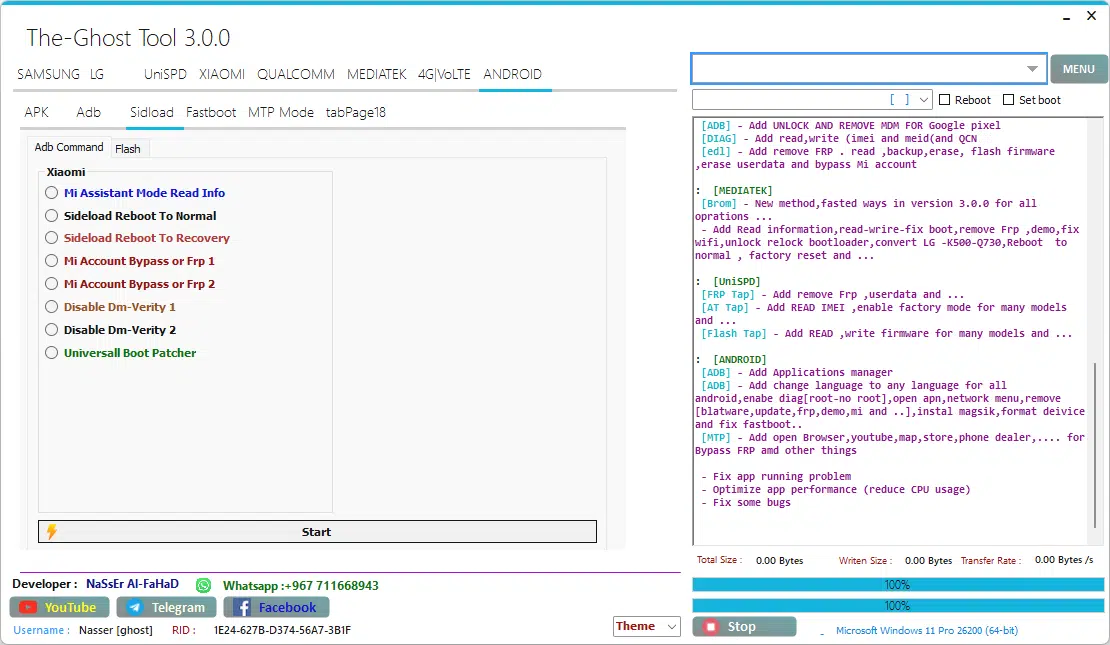
The-ghost tool 3. 0. 0 android adb command tab — read mi assistant info reboot to normal or recovery via sideload bypass mi account and frp with two dedicated methods disable dm verity 1 and 2 and patch the boot image with universal boot patcher
Fastboot
- Read Info
- Mi OS 6,7 Bypass
- Mi OS 8 Bypass
- Mi OS 9,10,11 Bypass 1
- Mi OS 9,10,11 Bypass 2
- Universal Mi
- Universal MiCloud New Method
- Disable Dm-Verity 1
- Disable Dm-Verity 2
- Universal Boot Patcher
- Sideload Reboot to Normal
- Sideload Reboot to Recovery
Vivo Section
- Unlock Bootloader
- Remove Demo after Unlock BL
- Reboot to EDL after Unlock BL
General Section
- Read Information [General]
- ERASE FRP (SPD, MTK, Qualcomm, Nokia, Motorola)
- ERASE FRP + PIN (MTK, Qualcomm, Nokia)
- Unlock OEM
- Relock OEM
- Reboot
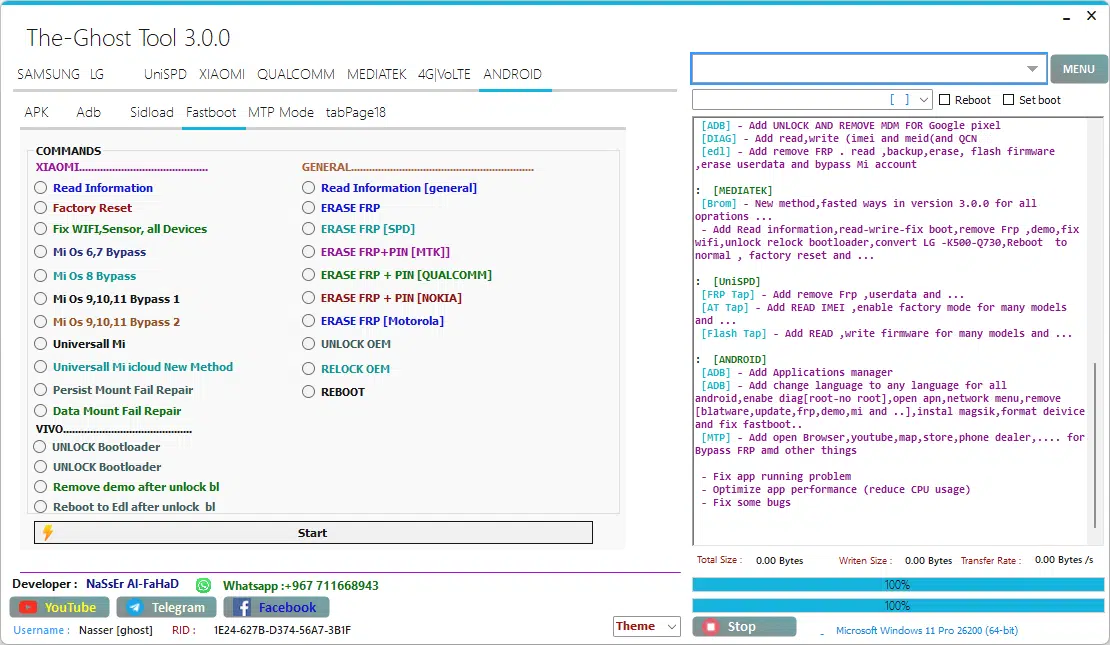
The-ghost tool android fastboot tab — bypass xiaomi mi os 6 through 11 fix wifi and sensor issues repair persist and data mount failures unlock and reboot vivo bootloaders to edl and erase frp across spd mtk qualcomm nokia and motorola devices — plus unlock oem relock oem and reboot
Supported Brands And Chipsets
One Of The Biggest Reasons Mobile Repair Professionals Trust The Ghost Tool Is Its Massive Brand And Chipset Compatibility. You Don’t Need Five Different Tools Sitting On Your Desktop. This Single Utility Handles Most Of The Android Devices You’ll Encounter In A Real Shop Environment. Here’s A Quick Breakdown Of What’s Supported:
| Brand | Chipset Support | Key Functions |
| Samsung | Qualcomm / Exynos | Frp Remove (Mtp/Adb/Download) Knox Disable Csc Change Odin Flash Softbrick Fix |
| Xiaomi / Redmi | Qualcomm / MediaTek | Mi Cloud Reset Frp Remove Mi Flash Edl Flash Anti-relock Bypass |
| LG | Qualcomm | Imei Write Meid Repair Frp Remove Carrier Unlock Adb Unlock Modem Commands |
| Motorola | Qualcomm / MediaTek | Frp Erase Factory Reset Oem Unlock Via Adb And Edl Modes |
| Vivo | MediaTek / Qualcomm | Bootloader Unlock Demo Remove Edl Reboot Bloatware Removal |
| Nokia | Qualcomm / MediaTek | Frp Erase Pin Erase Factory Reset Via Generic Methods |
| Oppo / Realme | MediaTek / Qualcomm | Diag Mode Frp Erase Oem Unlock/relock Bloatware Removal |
How To Use The Ghost Tool — Step By Step
Using This Tool Is Easier Than You Might Think. You Don’t Need Any Technical Background To Get Started. Just Follow These Steps Carefully And You’ll Be Up And Running Within Minutes.
- Download The Ghost Tool V3.0.0 Zip File From A Trusted And Verified Source
- Extract The Zip Using Winrar Or 7-zip — Make Sure You Extract To A Clean Folder
- Right-click Setup.exe And Select ‘run As Administrator’ — This Is Important
- Follow The Standard Windows Installation Wizard Until It Completes
- Launch The Tool Shortcut From Your Desktop Or Installation Directory
- The Login Screen Will Appear With Pre-filled Credentials — Wait 5–10 Seconds
- The Tool Will Auto-login And Load The Main Interface Automatically
- Install The Correct Usb Drivers For Your Device (qualcomm Mtk Or Samsung)
- Connect Your Android Phone Via Usb In The Correct Mode (adb Mtp Edl Or Fastboot)
- Select Your Brand Tab Choose The Function You Need And Press Start
System Requirements
Os: Windows Xp / 7 / 8 / 8.1 / 10 / 11 (32-bit & 64-bit) | Ram: 2gb Minimum (4gb Recommended) | Storage: 500mb Free Space | Connection: Usb Data Cable + Device-specific Drivers | Internet: Required For Auto-login On First Launch
Download The Ghost Tool Latest Version
Getting The Ghost Tool On Your Windows Pc Is Completely Free And Straightforward. The Latest Version — V3.0.0 — Is The Most Feature-rich Release To Date. It Adds Support For Android 15 Frp Bypass Improved Samsung New-security Frp Removal Updated Xiaomi Mi Cloud Bypass Methods And A Cleaner Interface Overall. The File Size Is Approximately 300mb So Make Sure You Have A Stable Internet Connection Before Downloading.
However One Critical Thing You Must Keep In Mind Always Download From A Reputable And Trusted Source. There Are Dozens Of Unofficial Websites Circulating Modified Versions Of This Tool And Some Of Them Contain Malware Bundled Adware Or Simply Outdated Files That No Longer Work. Once You’ve Downloaded And Extracted The Zip The Login Happens Automatically No Username Or Password Entry Needed. The Tool Is Developed And Maintained By Nasser Al Fahad And It Remains Completely Free With No License Key Or Subscription Required.
Why Mobile Technicians Prefer The Ghost Tool Over Others
There Are Dozens Of Android Repair Tools Floating Around The Internet. So What Makes This One Stand Out? First It’s Completely Free No Credits No Subscriptions No Dongle Required. Most Professional Tools Like Octoplus Z3x Or Eft Pro Cost Money And Require Hardware Dongles. The Ghost Tool Gives You A Massive Chunk Of That Functionality At Zero Cost. That Alone Makes It Incredibly Appealing For Small Repair Shops And Solo Technicians Who Are Just Starting Out.
Second The Interface Is Beginner-friendly But Powerful Enough For Experts. Everything Is Organized By Brand And Function Samsung Xiaomi Lg Qualcomm Mediatek Android (adb) 4g And Volte All Have Their Own Dedicated Sections. You Don’t Need To Dig Through Menus Or Read A Manual To Figure Out What To Press. Third It Gets Regular Updates. The Jump From V2.0 To V3.0 Brought Significant Improvements Including Android 15 Support New Frp Bypass Methods And Additional Brand Coverage. That Commitment To Updates Is Why The Tool Maintains A Loyal User Base Across Repair Communities Worldwide.
Frequently Asked Questions (FAQ)
Is The Ghost Tool Completely Free To Use?
Yes. The Ghost Tool Is 100% Free With No License Key Activation Code Or Paid Subscription Required. It Uses Pre-filled Auto-login Credentials So You Don’t Need To Register Or Pay Anything.
Which Windows Versions Does It Support?
It Runs On Windows Xp 7 8 8.1 10 And 11 — Both 32-bit And 64-bit Versions. There Is No Mac Or Linux Version Available.
Does The Ghost Tool Support Android 15?
Yes. Version 3.0.0 Added Full Support For Android 14 And Android 15 Frp Bypass Across Supported Brands Including Samsung Xiaomi And Others.
Is It Safe To Download And Use?
The Tool Itself Is Safe When Downloaded From A Trusted Source. Always Scan Downloaded Files With Your Antivirus Before Running. Avoid Third-party Sites That Bundle Additional Software.
Can I Use It To Fix A Bricked Phone?
Yes. The Firmware Flashing Section Supports Softbrick Fix For Samsung And Edl/fastboot Flash For Qualcomm And Mediatek Devices. However Hard-bricked Devices With Hardware Damage Cannot Be Fixed By Any Software Tool.
Final Thoughts
At The End Of The Day The Ghost Tool Is One Of The Most Complete And Accessible Free Android Repair Utilities Available In 2026. It Handles Frp Bypass Firmware Flashing Imei Repair Bootloader Unlocking Mi Cloud Removal 4g/volte Management And Much More All From A Single Windows Application With No Cost Attached.
Whether You’re A Mobile Technician Looking To Reduce Your Toolbox Costs Or Someone Trying To Regain Access To Their Own Device This Tool Deserves A Spot On Your Pc. Just Remember To Download It From A Verified Source Use It Responsibly On Devices You Own And Always Install The Correct Usb Drivers Before Connecting Your Phone. If You Do All That You’ll Find It’s One Of The Most Reliable And Versatile Android Unlock Tools You’ve Ever Used.
The Ghost Tool
Download Link:: Usersdrive – Mediafire – 4shared – My.pcloud – Playbook – Google Drive – DropBox – Mega – Vexfile