Easy and free frp unlock for samsung android 16 devices
Getting Stuck On A Google Account Lock After A Reset Can Be Really Frustrating Especially When It’s Your Own Samsung Phone And You Just Want To Use It Again. Many Users Start Searching For A Samsung Android 16 Frp Bypass Tool Because They’re Tired Of Confusing Steps Paid Software Or Methods That Simply Don’t Work. If You’re Feeling Stressed Or Stuck At The Setup Screen You’re Definitely Not Alone.
In This Blog Post We’ll Explain How The Samsung Android 16 Frp Bypass Tool Can Help You Unlock Your Device Quickly And Safely. You’ll Learn About Its One-click Bypass Feature Adb Mode Support Wide Compatibility With Samsung Models And The Fact That It’s Completely Free To Use. This Guide Is Written In Simple Words So You Can Follow Along Easily And Get Your Phone Working Again Without Hassle.
What Is The Samsung Android 16 Frp Bypass Tool
The Samsung Android 16 Frp Bypass Tool Is Designed For Users Who Get Stuck On The Google Account Verification Screen After A Factory Reset. This Situation Usually Happens When You Forget The Previously Synced Google Account Or Buy A Second-hand Samsung Phone. The Tool Focuses On Making The Bypass Process Simple Fast And Stress-free For Normal Users.
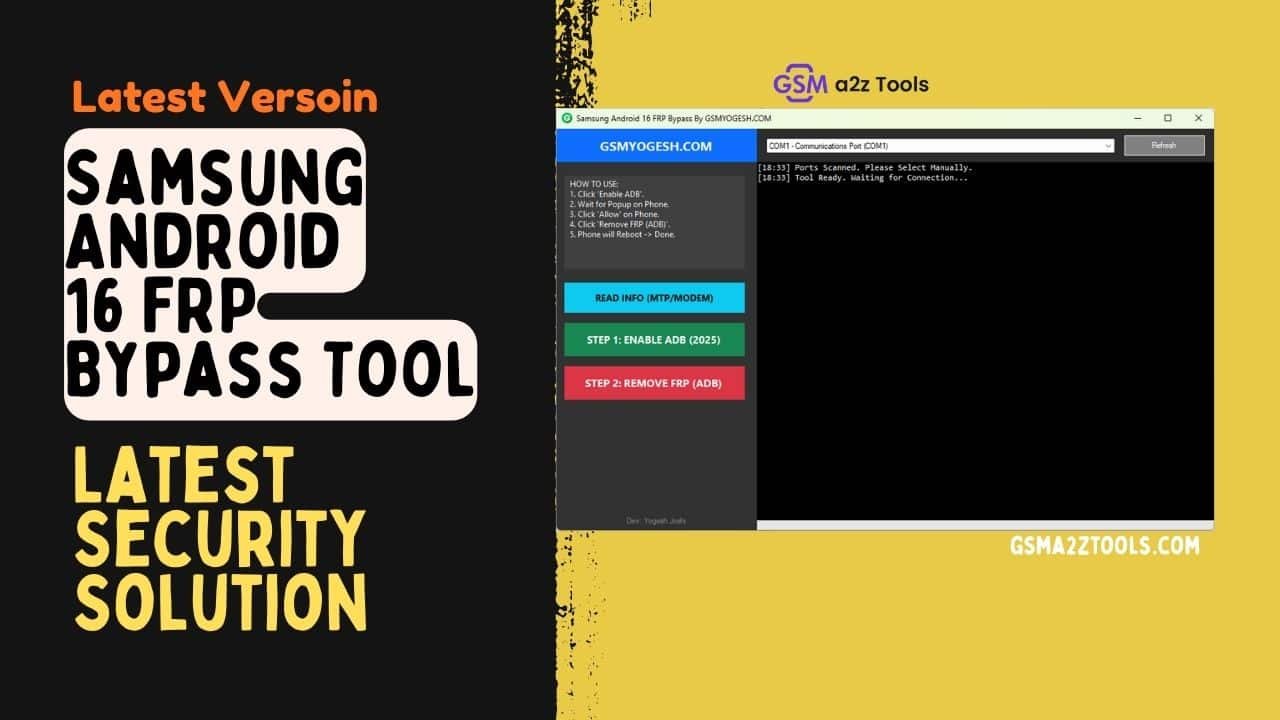
What Makes This Tool Popular Is Its One-click Approach And Adb-based Functionality. It Allows You To Read Device Info Using Mtp/modem Mode Enable Adb When Needed And Remove Frp Through Adb Without Complicated Steps. Samsung Android 16 Frp Bypass Tool Supports A Wide Range Of Samsung Models Including S-series A-series M-series And Foldable Devices And It Works Without Paid Activation.
Download The Samsung Android 16 Frp Bypass Tool Latest Versoin
Downloading The Latest Version Of The Samsung Android 16 Frp Bypass Tool Is Important To Ensure Compatibility With Android 16 Security Updates. New Versions Usually Fix Bugs Add Support For Newer Samsung Devices And Improve Stability During The Frp Removal Process. Using An Outdated Tool Can Cause Errors Or Incomplete Bypass Attempts.
Once Downloaded The Tool Lets You Connect Your Samsung Device And Perform Actions Like Read Info (mtp/modem) Enable Adb And Remove Frp (adb) In A Guided Flow. The Interface Is Beginner-friendly So Even Users With Basic Knowledge Can Follow Along Easily. If You’re Looking For A Free Reliable Way To Unlock Your Samsung Device This Latest Version Is Built To Give You Exactly That Solution Without Unnecessary Complexity.
Key Features Of Samsung Android 16 Frp Bypass Tool
One Of The Main Highlights Of This Tool Is Its One-click Frp Bypass Function. Instead Of Following Long Tutorials You Can Remove The Lock Using Simple Guided Options. This Saves Both Time And Effort Especially For Users Who Are Not Technicians.
Another Strong Feature Is Adb Mode Support Which Allows Deeper Access When Standard Methods Don’t Work. The Tool Also Supports A Wide Range Of Samsung Devices Including S-series A-series M-series And Foldables. Best Of All It’s Free To Use With No Hidden Charges.
Read Info (Mtp/Modem) Function Explained
The Read Info (mtp/modem) Option Helps The Tool Detect Your Samsung Device Properly. It Collects Basic Device Details Like Model Port Status And Connection Mode. This Step Ensures The Tool Communicates Correctly With Your Phone Before Starting Frp Removal.
Using Mtp Or Modem Mode Reduces Connection Errors During The Process. It Also Helps The Tool Decide The Correct Method For Enabling Adb. This Feature Is Especially Useful When The Phone Isn’t Fully Accessible From The Settings Menu.
Enable Adb Option And Its Importance
Adb Plays A Major Role In Removing Frp On Newer Android Versions. The Enable Adb Option Allows The Tool To Activate Debugging Access Even When The Phone Is Locked. Without Adb Most Modern Frp Methods Simply Won’t Work.
This Option Is Designed To Be Safe And User-friendly. You Don’t Need To Manually Enter Complex Commands Or Settings. Once Adb Is Enabled The Tool Can Move Smoothly To The Frp Removal Stage.
Remove Frp (Adb) Process Overview
The Remove Frp (adb) Feature Is The Core Function Of The Tool. It Uses Adb Access To Bypass The Google Account Verification Linked To The Device. This Method Is Effective On Android 16 Because It Works At The System Communication Level.
After Successful Execution The Phone Restarts Without Asking For The Previous Google Account. You Can Then Set Up The Device As New And Add Your Own Account. This Makes The Tool Especially Helpful For Second-hand Phone Users.
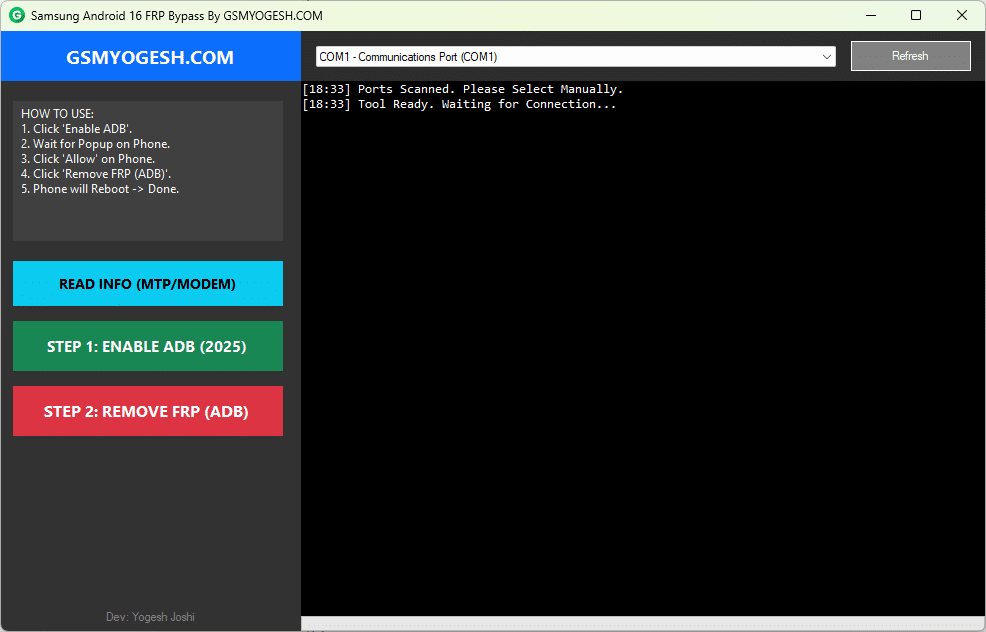
Samsung android 16 frp bypass tool for easy and free google frp lock removal
Supported Samsung Models And Compatibility
The Samsung Android 16 Frp Bypass Tool Supports A Wide Range Of Devices. This Includes Popular Samsung S-series A-series M-series And Newer Foldable Phones. Compatibility Across Multiple Models Makes It A Flexible Solution.
It Also Works With Different Firmware Builds Running Android 16. Regular Updates Help Maintain Support For Newly Released Devices. This Ensures The Tool Remains Useful Even As Samsung Releases New Models.
Frequently Asked Questions (FAQs)
What Is Frp Lock On Samsung Android 16 Devices?
Frp (Factory Reset Protection) Is A Security Feature That Activates After A Factory Reset. It Asks For The Previously Synced Google Account To Protect The Device From Unauthorized Use.
Does The Samsung Android 16 Frp Bypass Tool Really Work On Android 16?
Yes The Tool Is Designed To Work With Android 16 Security Updates. Using The Latest Version Improves Success And Compatibility With Newer Samsung Firmware.
Is It Safe To Use The Samsung Android 16 Frp Bypass Tool?
When Used Correctly The Tool Is Generally Safe For Your Device. It Does Not Damage Hardware And Focuses Only On Bypassing The Google Account Lock.
Do I Need Technical Skills To Use This Tool?
No Advanced Technical Knowledge Is Required. The Interface Is Simple And Guided Making It Suitable For Beginners.
Which Samsung Models Are Supported By This Tool?
The Tool Supports Samsung S-series A-series M-series And Foldable Devices. Compatibility May Vary Based On Firmware Version.
Final Thoughts
The Samsung Android 16 Frp Bypass Tool Is A Practical Solution For Users Facing Google Lock Issues. It Combines Simple Options Like Read Info Enable Adb And Remove Frp Into One Easy Workflow. The Tool Is Designed With Real User Problems In Mind.
If You’re Locked Out Of Your Samsung Phone And Want A Free Effective Solution This Tool Is Worth Considering. It’s Beginner-friendly Compatible With Many Devices And Built For Modern Android Security. With The Right Steps You Can Regain Access To Your Phone Without Unnecessary Stress.
How To Download
- Find The File Or Content You Want To Download.
- Find The Download Page And Don’t Click Button And Click Only The (Download Link)
- Choose The Destination Folder On Your Device To Save The Downloaded File.
- Wait For The Download To Complete And Enjoy Your Content!
Samsung Android 16 FRP Bypass Tool
Download Link:: Usersdrive – Mediafire – 4shared – My.pcloud – Playbook – Disk.Yandex – DropBox – Mega – Vexfile